For most people, 16GB of RAM is enough for smooth everyday use like browsing, studying, office work, video calls, streaming, and light gaming. Choose 32GB RAM for gaming, creative work, coding, or heavy multitasking, and 64GB or more only for professional workloads like 8K editing, 3D rendering, or AI tools.
RAM needs vary based on how you use your computer. While 8GB can handle basic tasks, 16GB or 32GB offers a better experience for most users. More RAM helps with multitasking, but it won’t fix performance issues caused by a weak CPU, GPU, or slow storage.
In this article, we’ll break down how much RAM you need for different use cases, compare common RAM sizes, and help you choose the right amount for your needs.
Key Takeaways
- 16GB RAM is the best choice for most people because it handles daily multitasking comfortably.
- 8GB RAM is still usable for basic browsing, email, streaming, and Chromebook-style cloud work.
- 32GB RAM is worth it for modern gaming, video editing, coding, streaming, heavy multitasking, and AI PC workloads.
- 64GB RAM or more is mainly for professionals working with large files, 8K footage, 3D projects, virtual machines, or local AI models.
- More RAM only helps when memory is the bottleneck. It does not automatically improve gaming FPS or fix a weak processor, graphics card, or slow storage drive.
- Laptop buyers should choose carefully because many modern thin laptops use soldered memory that cannot be upgraded later.
Quick Answer: How Much RAM Do You Need?
For a modern Windows computer, 4GB should be treated as the technical minimum, not a comfortable amount. Microsoft lists 4GB RAM as the minimum requirement for Windows 11, but minimum requirements only mean the operating system can run, not that it will feel fast with modern apps and multitasking.
Your ideal RAM amount depends on your operating system, browser habits, apps, games, creative workload, and upgrade options. A person who checks email and watches YouTube does not need the same RAM as someone who edits 4K video or runs virtual machines. The right amount is the amount that keeps your real daily workload smooth without wasting money.
| RAM Amount | Best For | Simple Verdict |
| 4GB | Very old or basic systems | Not recommended for modern Windows PCs |
| 8GB | Basic browsing, email, streaming, Chromebooks | Usable, but limited |
| 16GB | Everyday use, students, office work, multitasking | Best choice for most people |
| 32GB | Gaming, creators, heavy multitasking, AI PCs | Best for power users |
| 64GB | 4K or 8K editing, 3D work, VMs, local AI models | Professional level |
| 128GB+ | Advanced workstations, massive datasets, serious production | Specialist use only |
What Does RAM Actually Do?
RAM stands for Random Access Memory. It is your computer’s short-term working memory. Your computer uses RAM to hold the apps, files, browser tabs, and background tasks you are actively using right now.
Storage is different. Your SSD or hard drive keeps your files, photos, games, apps, and operating system permanently. RAM only holds active data temporarily. When you shut down your computer, most data in RAM is cleared.
A simple way to understand RAM is to think of it as your desk. Storage is the cabinet where everything is kept. RAM is the desk space where you place the things you are currently working on. A bigger desk lets you keep more things open at once without feeling crowded.
More RAM helps most when you run multiple things at the same time. For example, RAM matters when you have a video call open, 20 browser tabs running, a spreadsheet loaded, music playing, and a few background apps active. If the system runs out of RAM, it has to move some active data to storage, which is much slower.
RAM vs Storage: What Is The Difference?
| Feature | RAM | Storage |
| Purpose | Temporary active workspace | Permanent file storage |
| Example | Open apps and browser tabs | Photos, videos, games, documents |
| Speed | Very fast | Slower than RAM |
| Clears after shutdown? | Yes | No |
| Upgrade impact | Better multitasking | More space and faster loading |
RAM helps your computer handle active tasks. Storage helps your computer keep files and load data. Both matter, but they solve different problems. If your computer has too little RAM, it may lag while multitasking. If your storage drive is too slow or too full, apps and files may take longer to open.
Why RAM Matters For Computer Performance
RAM affects how smooth your computer feels during active use. It does not always increase raw speed, but it helps your system avoid slowdowns when many apps, browser tabs, or files are open at the same time.
When your computer does not have enough RAM, it may use part of your SSD or hard drive as temporary memory. This is often called virtual memory or swap memory. It helps prevent crashes, but it is slower than real RAM. That is why a computer with low RAM can feel laggy even if it has a decent processor.
More RAM can reduce freezing, stuttering, slow tab switching, and app reloads. It is especially helpful for multitasking, creative software, games, coding tools, large spreadsheets, and video calls with screen sharing.
Signs you may need more RAM include:
- Your computer slows down with many browser tabs open.
- Apps freeze when switching between them.
- Video calls lag while other apps are open.
- Games stutter even when the graphics card is capable.
- Editing software becomes slow with larger projects.
- Task Manager often shows memory usage above 80%.
- Apps reload instead of staying open in the background.
However, RAM is not the only reason a computer becomes slow. A weak CPU, old hard drive, low storage space, overheating, malware, or a weak graphics card can also cause poor performance.
Is 8GB RAM Enough?
8GB RAM is enough for basic use, but it is no longer ideal for a main Windows laptop or desktop. It can work for browsing, email, streaming, Google Docs, Microsoft Word, and light schoolwork. However, it can feel limited if you keep many tabs open or run several apps at once.
For Windows PCs, 8GB should be seen as the practical starting point for light use. Windows, browser tabs, antivirus software, update services, cloud sync tools, and background apps can quickly use a large part of that memory. Once your system gets close to the limit, performance can drop.
Chromebooks are a major exception. ChromeOS is designed around lighter, cloud-focused workflows, so 8GB can feel more comfortable on a Chromebook than on a Windows laptop. Google lists 8GB RAM or more as part of the Chromebook Plus hardware specification.
8GB RAM is enough if you:
- Browse with only a few tabs open.
- Use email, YouTube, Netflix, and Google Docs.
- Use a Chromebook or lightweight secondary laptop.
- Write documents and do basic schoolwork.
- Do not play demanding games.
- Do not edit videos or use heavy creative apps.
8GB RAM is not ideal if you:
- Keep many browser tabs open.
- Use Zoom, Teams, or Meet while multitasking.
- Play modern AAA games.
- Edit photos or videos.
- Use large spreadsheets.
- Want the computer to feel smooth for several years.
- Buy a laptop with memory that cannot be upgraded later.
If you are buying a new Windows laptop or desktop for daily use, 8GB should only be considered when budget is the main concern. For a smoother and longer-lasting experience, 16GB is the better choice.
Is 16GB RAM Enough?
16GB RAM is enough for most people. It is the best balance for everyday users, students, remote workers, office employees, home users, and casual gamers. It gives enough headroom for modern operating systems, browser tabs, office apps, video calls, streaming, and light creative work.
With 16GB RAM, your computer can handle normal multitasking without constantly relying on slower virtual memory. You can keep several browser tabs open, join a video meeting, work on documents, stream music, and use background apps without the system feeling cramped.
16GB is also a safer choice if you want to keep your computer for several years. Software tends to become heavier over time, and browser-based work keeps growing. If you are buying a laptop with soldered RAM, choosing 16GB instead of 8GB can prevent frustration later.
16GB RAM For Everyday Use
For everyday use, 16GB RAM gives you a smooth experience with browsing, email, video streaming, online shopping, banking, social media, and basic photo management. It is more than enough for people who mostly use a computer for personal tasks.
This amount is also helpful because modern browsers can use a lot of memory. If you open many tabs, watch videos, use web apps, and keep background tools running, 16GB gives the system room to breathe.
16GB RAM For Students
For students, 16GB RAM is a smart choice. It can handle research tabs, PDFs, Microsoft Word, Google Docs, online classes, video calls, note-taking apps, and learning platforms at the same time.
Students often multitask more than they realize. A typical study session may include a browser, PDF reader, video lecture, notes app, messaging app, and document editor. 16GB keeps that workflow smoother than 8GB.
16GB RAM For Office Work
For office work, 16GB RAM should be the starting point for comfort. It works well with Microsoft Office, Google Workspace, Slack, Microsoft Teams, Zoom, spreadsheets, CRM tools, browser dashboards, and cloud storage apps.
If your work involves basic documents, emails, calls, and web apps, 16GB is enough. If you work with large spreadsheets, many browser windows, dual monitors, or several business tools open all day, 32GB may feel better.
16GB RAM For Casual Gaming
For casual gaming, 16GB RAM is still fine for many games. It works well for esports titles, indie games, older games, and many mainstream titles.
However, 16GB can become limiting in some newer AAA games, especially if you keep Discord, a browser, recording software, or streaming tools open in the background. The game itself may run, but the full gaming setup may need more memory.
Is 32GB RAM Worth It?
32GB RAM is worth it if you are a gamer, creator, developer, streamer, heavy multitasker, or long-term laptop buyer. It is not necessary for everyone, but it gives more breathing room for demanding workflows.
For normal browsing and office work, 32GB may not feel much faster than 16GB. However, it becomes useful when you keep many apps open all day, play modern games, edit videos, run virtual machines, use coding tools, or work with large files.
32GB is also a smart choice when the laptop has soldered RAM. If the memory cannot be upgraded later, buying 32GB upfront can extend the useful life of the machine.
32GB RAM is worth it if you:
- Play modern AAA games.
- Stream or record gameplay.
- Use Photoshop, Lightroom, Premiere Pro, or DaVinci Resolve.
- Work with large spreadsheets.
- Run multiple monitors with many apps open.
- Use virtual machines.
- Use coding tools, Docker, emulators, or local development environments.
- Use local AI tools or AI-assisted creative software.
- Want a laptop to last longer without feeling limited.
Microsoft also lists 16GB RAM as part of the requirements for some Copilot+ PC AI features, along with a 40 TOPS NPU and 256GB storage capacity. That does not mean every AI task needs 32GB, but it shows that modern AI-focused computers are moving beyond very low memory configurations.
Who Needs 64GB RAM Or More?
64GB RAM or more is mainly for professionals and advanced power users. Most normal users do not need it. If your daily work is browsing, studying, office work, streaming, and casual gaming, 64GB is usually overkill.
64GB starts to make sense when your projects are very large or when you run several heavy applications at once. Creative professionals, developers, engineers, data workers, and AI experimenters can benefit from this much memory because their workloads can easily exceed what 16GB or 32GB can handle.
You may need 64GB or more for:
- 8K video editing
- Large 4K multi-camera projects
- Heavy After Effects work
- 3D rendering and animation
- CAD and engineering software
- Game development
- Large software projects
- Multiple virtual machines
- Data science and large datasets
- Local AI models and LLM experiments
- Professional workstation tasks
Adobe lists 16GB RAM for HD media and 32GB or more for 4K and higher in its recommended Premiere requirements. That makes 32GB a practical choice for many 4K editors, while 64GB becomes more useful for heavier timelines, large projects, effects-heavy work, and higher-resolution footage.
Is 128GB RAM Overkill?
For most people, 128GB RAM is overkill. It will not make everyday browsing, video calls, schoolwork, or normal gaming feel meaningfully faster than a well-balanced 16GB or 32GB system.
However, 128GB can make sense for advanced workstations. It is useful for large simulations, massive datasets, professional 3D scenes, complex engineering work, heavy virtualization, and local AI experiments with larger models.
How Much RAM Do You Need By Use Case?
| Use Case | Recommended RAM | Why |
| Basic browsing and email | 8GB | Enough for light tasks |
| Everyday home use | 16GB | Better for smooth multitasking |
| Students | 16GB | Handles research, classes, and documents |
| Office work | 16GB | Good for productivity apps and video calls |
| Heavy multitasking | 32GB | More headroom for many apps |
| Casual gaming | 16GB | Still enough for many games |
| AAA gaming | 32GB | Better for newer demanding titles |
| Streaming while gaming | 32GB | Handles game plus background apps |
| Photo editing | 16GB to 32GB | Depends on file size and layers |
| 4K video editing | 32GB | Better for smooth timelines |
| 8K video editing | 64GB+ | Large files need more memory |
| Programming | 16GB to 32GB | Depends on tools and environments |
| Virtual machines | 32GB to 64GB+ | Each VM needs dedicated memory |
| AI tools and local LLMs | 32GB to 64GB+ | Models can require large memory pools |
For Web Browsing And Everyday Use
For web browsing and everyday use, 8GB is the minimum and 16GB is ideal. If you only open a few tabs, check email, watch videos, and use simple documents, 8GB can work.
Choose 16GB if you want a smoother experience. It is better for people who keep many tabs open, use web apps, stream music, sync cloud files, and run background tools.
For Students
For students, 16GB is the best choice. It handles online classes, research tabs, PDFs, writing apps, video calls, note-taking tools, and browser-based learning platforms.
Students should avoid 4GB and be careful with 8GB, especially if the laptop cannot be upgraded. A laptop with 16GB RAM will usually feel better for schoolwork over several years.
For Office Work And Remote Work
For office work and remote work, 16GB is the comfortable minimum. It supports Microsoft Office, Google Workspace, email, Zoom, Teams, Slack, browser tabs, spreadsheets, and project management tools.
Choose 32GB if you work with large spreadsheets, multiple monitors, many browser dashboards, CRM tools, analytics platforms, or several apps open at once.
For Gaming
For gaming, the right RAM depends on the games you play and what else runs in the background.
- 8GB RAM: Only suitable for light, older, or indie games.
- 16GB RAM: Good baseline for mainstream gaming.
- 32GB RAM: Better for modern AAA gaming, multitasking, and future headroom.
RAM alone does not decide gaming performance. The graphics card and processor matter more for FPS in most games. However, not having enough RAM can cause stuttering, slow loading, and poor background app performance.
For Streaming And Gaming Together
For streaming and gaming together, 32GB RAM is the better choice. Streaming uses extra memory because the system may run the game, OBS, Discord, browser tabs, overlays, capture tools, and background apps at the same time.
If you only game casually, 16GB can be fine. If you stream, record gameplay, talk on Discord, and keep apps open on a second monitor, 32GB gives much better breathing room.
For Photo Editing And Graphic Design
For photo editing and graphic design, 16GB is fine for light work, while 32GB is better for serious work. If you edit simple photos, design small graphics, or use light Photoshop files, 16GB can work well.
Choose 32GB if you work with large RAW files, many layers, high-resolution images, multiple design apps, or large creative projects. More RAM helps keep previews, layers, and multitasking smoother.
For Video Editing
Video editing can use a lot of RAM, especially with high-resolution footage and effects.
- 1080p editing: 16GB can work.
- HD media in Adobe Premiere: Adobe recommends 16GB RAM for HD media.
- 4K editing: 32GB is better, and Adobe recommends 32GB or more for 4K and higher.
- 6K or 8K editing: 64GB or more is recommended for smoother professional work.
- Heavy effects and motion graphics: 64GB can help reduce slowdowns.
If video editing is your main work, do not choose RAM alone. A fast SSD, strong CPU, capable GPU, and enough storage are also important.
For Programming And Software Development
For programming, 16GB is enough for basic coding, web development, and learning. It handles code editors, browsers, terminals, and simple local servers.
Choose 32GB if your work includes:
- Large IDEs
- Docker containers
- Android emulators
- Local databases
- Virtual machines
- Large codebases
- Multiple development tools
- Browser testing across many tabs
For advanced development, 64GB can be useful, especially when running multiple virtual machines, containers, databases, and heavy build tools together.
For Virtual Machines
For virtual machines, 32GB should be considered the practical starting point. Each virtual machine uses part of your system RAM. If your host computer has only 16GB, running one or two VMs can quickly make the system feel tight.
Choose 64GB or more if you run multiple VMs, test different operating systems, use lab environments, or work in cybersecurity, IT, software testing, or enterprise development.
For AI PCs And Local AI Tools
For AI PCs and local AI tools, 32GB is a practical starting point. AI workloads can vary widely. Simple AI features may run fine on systems with less RAM, but local models, AI-assisted editing tools, and larger datasets often need more memory.
Choose 64GB or more if you plan to experiment with larger local AI models, local LLMs, data-heavy workflows, or AI development. RAM alone does not make AI fast. The CPU, GPU, NPU, VRAM, storage speed, and software optimization also matter.
8GB vs 16GB vs 32GB vs 64GB RAM: Which Should You Choose?
For most readers, 16GB is the safest recommendation. It gives enough room for everyday multitasking without wasting money on memory you may never use.
Choose 32GB if you can afford it and plan to keep the computer for several years. It is especially useful for gaming, creative work, development, streaming, and heavy multitasking.
Choose 64GB only when your software or workload clearly needs it. If you are not sure whether you need 64GB, you probably do not.
| RAM | Good For | Not Good For | Best User Type |
| 8GB | Light use, Chromebooks, simple browsing | Heavy multitasking, gaming, editing | Basic users |
| 16GB | Most daily tasks, school, office, casual gaming | Heavy creative work, advanced gaming | Most people |
| 32GB | Gaming, creators, developers, multitaskers | Usually unnecessary for basic users | Power users |
| 64GB | Professional editing, VMs, 3D, AI workloads | Overkill for normal use | Professionals |
How To Check How Much RAM You Have
Before buying more RAM, check how much you already have and how much you actually use. This is the simplest way to know whether memory is your real bottleneck.
How To Check RAM On Windows
- Press Ctrl + Shift + Esc.
- Open Task Manager.
- Click Performance.
- Select Memory.
- Check total RAM, current usage, speed, and slots used.
If your memory usage often stays above 80% during normal work, RAM may be one of your bottlenecks. If memory usage is low but the computer is still slow, the issue may be the CPU, storage drive, graphics card, software, or heat.
How To Check RAM On Mac
- Click the Apple menu.
- Select About This Mac.
- Check the memory section.
- For deeper usage, open Activity Monitor.
- Click the Memory tab to see memory pressure and app usage.
On modern Macs with unified memory, RAM is shared across the CPU, GPU, and system tasks. That makes choosing enough memory at purchase very important because many Macs cannot be upgraded later.
How To Check RAM On Chromebook
On a Chromebook, you can usually check memory through system settings or ChromeOS diagnostics, depending on your device version. You can also type Diagnostics into the launcher and open the Diagnostics app if available.
Chromebooks are cloud-focused, so 8GB often feels better on ChromeOS than it does on a Windows laptop. Still, if you keep many tabs open or use Android apps, Linux tools, or creative apps, more RAM can help.
How To Know If You Need More RAM
You probably need more RAM if:
- Your PC slows down when many tabs are open.
- Apps reload when you switch between them.
- Games stutter while background apps are running.
- Video editing timelines freeze or lag.
- Large spreadsheets become slow.
- Your system uses virtual memory heavily.
- Task Manager shows high memory usage during normal work.
- Your laptop becomes slow during video calls and screen sharing.
- You close apps only to make the computer usable again.
The best way to check is to watch memory usage during your normal workload. Do not test with a clean desktop and no apps open. Open the apps, tabs, files, and tools you normally use. Then check whether RAM usage is high.
If RAM usage is consistently high, an upgrade can help. If RAM usage is not high, look at other possible causes like slow storage, overheating, startup apps, malware, an old processor, or a weak graphics card.
Will More RAM Make Your Computer Faster?
More RAM makes your computer faster only if you were running out of RAM before. If your current memory is not fully used, adding more RAM may not noticeably improve speed.
For example, upgrading from 8GB to 16GB can make a big difference if your computer often slows down with many tabs and apps open. Upgrading from 16GB to 32GB may help if you game, edit videos, code, stream, or multitask heavily. But upgrading from 32GB to 64GB may do very little for basic browsing and office work.
More RAM helps with multitasking, app switching, large files, video editing, gaming with background apps, and virtual machines. It reduces slowdowns caused by memory swapping.
More RAM does not automatically increase FPS in every game. It also does not fix a weak CPU, weak GPU, nearly full storage drive, overheating laptop, or old hard drive. In some older computers, upgrading from an HDD to an SSD can feel more noticeable than adding more RAM.
RAM Speed, DDR4, DDR5, And Capacity: What Matters More?
For most users, RAM capacity matters more than RAM speed. Having enough memory is more important than having slightly faster memory. A computer with 16GB of decent RAM will usually feel better than a computer with 8GB of faster RAM if the 8GB system keeps running out of memory.
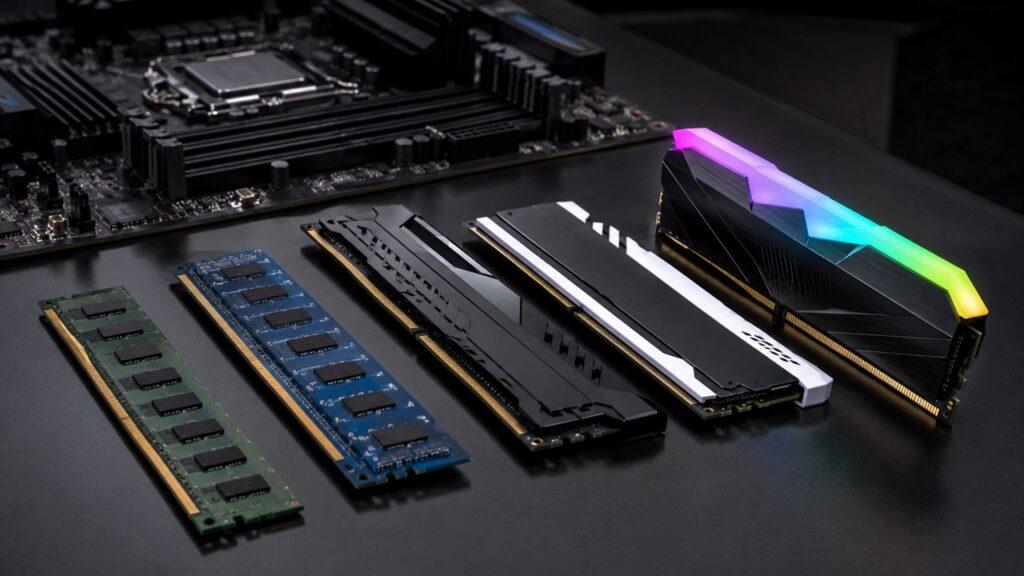
DDR5 is common in newer systems, while DDR4 is still used in many older desktops and laptops. DDR5 can offer higher bandwidth, but you cannot install DDR5 RAM into a DDR4 motherboard. The physical slot and platform support are different.
Laptop memory can be more complicated. Some laptops use upgradeable SODIMM modules, while others use soldered LPDDR memory that is permanently attached to the motherboard. If the RAM is soldered, you must choose the right amount when buying the laptop.
When choosing RAM, check:
- RAM type: DDR4, DDR5, LPDDR5, LPDDR5X, or another supported type
- Maximum supported capacity
- Number of available RAM slots
- Laptop upgradeability
- RAM speed supported by the CPU and motherboard
- Whether the system uses soldered memory
- Whether dual-channel memory is supported
- Warranty rules before opening the device
Dual-channel memory can improve performance in some systems because it gives the processor more memory bandwidth. This can matter more in systems with integrated graphics, where the GPU shares system memory.
Can You Upgrade RAM Later?
You can upgrade RAM later on many desktop computers. Most desktops have memory slots on the motherboard, so you can replace or add RAM modules if the board supports them.
Laptops are less predictable. Some gaming laptops and workstation laptops still allow RAM upgrades. Many thin laptops, ultrabooks, and modern premium devices use soldered RAM, which cannot be upgraded after purchase.
This matters because buying too little RAM can shorten the useful life of a laptop. If you buy an 8GB laptop with soldered memory, you may be stuck with that amount until you replace the entire computer.
Before buying or upgrading RAM, check:
- Does your device have RAM slots?
- Is the RAM soldered?
- What is the maximum supported RAM?
- Does it need DDR4 or DDR5?
- Are there empty slots available?
- What RAM speed is supported?
- Will opening the laptop affect warranty?
- Does the manufacturer provide a maintenance guide?
If you are buying a desktop, upgrading later is usually easier. If you are buying a laptop, especially a thin and light model, buying enough RAM upfront is safer.
Should You Buy More RAM Now Or Upgrade Later?
If you are buying a desktop, you can often start with 16GB and upgrade later. Desktops are usually easier to open, and RAM slots are more accessible.
If you are buying a laptop, choose more carefully. Many laptops cannot be upgraded later. For a laptop you want to use for 4 to 5 years, 16GB should be the minimum for most people. If you are a gamer, creator, developer, or heavy multitasker, 32GB is a safer long-term choice.
Do not buy more RAM just because the number looks better. Buy based on your workload. A basic user does not need 64GB. A video editor should not settle for 8GB. A student or office worker will usually be happiest with 16GB.
Common RAM Buying Mistakes To Avoid
Avoid these RAM buying mistakes:
- Buying 4GB RAM for a modern Windows PC.
- Choosing 8GB for a laptop you cannot upgrade later.
- Thinking RAM and storage are the same.
- Buying 64GB when 16GB is enough.
- Ignoring CPU, GPU, and SSD bottlenecks.
- Mixing incompatible RAM types.
- Buying RAM without checking motherboard support.
- Assuming more RAM always means more gaming FPS.
- Ignoring whether the laptop has soldered memory.
- Choosing RAM speed without checking CPU and motherboard support.
- Forgetting that creative software may need much more memory than basic apps.
The goal is not to buy the highest RAM number. The goal is to buy the right amount for your real work.
Final Recommendation: How Much RAM Should You Get?
Choose 8GB RAM only for light use, budget systems, Chromebooks, or secondary laptops. It can still work, but it is limited for modern multitasking.
Choose 16GB RAM if you want the best balance. It is the right choice for most home users, students, office workers, remote workers, and casual gamers.
Choose 32GB RAM if you game, edit videos, stream, code, use creative apps, work with large spreadsheets, or keep many programs open all day.
Choose 64GB RAM or more only if your work clearly needs it. This includes 8K editing, 3D work, large software projects, multiple virtual machines, large datasets, and local AI workloads.
| User Type | Best RAM Choice |
| Very light user | 8GB |
| Most home users | 16GB |
| Students | 16GB |
| Office workers | 16GB |
| Heavy multitaskers | 32GB |
| Casual gamers | 16GB |
| Serious gamers | 32GB |
| Streamers | 32GB |
| Photo editors | 16GB to 32GB |
| Video editors | 32GB to 64GB |
| Developers | 16GB to 32GB |
| Virtual machine users | 32GB to 64GB+ |
| AI and local LLM users | 32GB to 64GB+ |
| Professional workstation users | 64GB+ |
Related FAQs
Is 8GB RAM Enough Today?
Yes, 8GB RAM is enough for basic browsing, email, streaming, and light document work. However, it is not ideal for smooth multitasking on a main Windows PC.
Is 16GB RAM Enough For Most People?
Yes, 16GB RAM is enough for most people. It is the best choice for students, office workers, home users, remote workers, and everyday multitasking.
Is 32GB RAM Overkill?
32GB RAM is overkill for basic use, but it is useful for gaming, video editing, coding, streaming, heavy multitasking, and long-term laptop use.
Do I Need 64GB RAM?
You need 64GB RAM only if you use professional software, large creative projects, virtual machines, datasets, 3D tools, or local AI models. Most normal users do not need it.
Does More RAM Increase FPS In Games?
More RAM only increases FPS when your system was running out of memory before. In most games, the graphics card and processor affect FPS more than RAM capacity.
Is RAM The Same As Storage?
No, RAM and storage are different. RAM holds active tasks temporarily, while storage keeps files, apps, photos, videos, and games permanently.
How Do I Know If My RAM Is Enough?
Check Task Manager on Windows or Activity Monitor on Mac during normal use. If memory usage often stays above 80%, more RAM may help.
Should I Get 16GB Or 32GB RAM?
Choose 16GB RAM for normal use, school, office work, and casual gaming. Choose 32GB RAM if you game heavily, edit videos, code, stream, or want more long-term headroom.
Is 4GB RAM Enough For Windows 11?
Microsoft lists 4GB RAM as the minimum requirement for Windows 11, but it is not recommended for a smooth modern experience. Treat 4GB as a technical minimum only.
Is 8GB RAM Enough For A Chromebook?
Yes, 8GB RAM is usually enough for a Chromebook because ChromeOS is lighter and cloud-focused. Google also lists 8GB RAM or more in the Chromebook Plus hardware specification.
How Much RAM Do I Need For 4K Video Editing?
For 4K video editing, 32GB RAM is a strong recommendation. Adobe recommends 32GB or more for 4K and higher in Premiere.
How Much RAM Do I Need For AI Tools?
For light AI features, 16GB can be enough. For local AI tools, larger models, or AI development, 32GB to 64GB or more is a better choice.

Justin has spent years learning how blogs, websites, hosting, and online income work in the real world. Along with blogging and SEO, he also covers desktops, laptops, PC parts, and everyday tech, sharing easy-to-understand advice for readers who want to build better websites and choose better tools.