DDR5 is the better choice if you are building a new PC today because it gives you more bandwidth, higher capacity options, and better support for newer platforms. But DDR4 still makes sense if you already have an older PC, want a cheaper upgrade, or are trying to save money for a better CPU or graphics card.
In this guide, we will compare DDR4 and DDR5 RAM in a simple way. We will look at speed, latency, gaming performance, productivity, laptop use, motherboard compatibility, price, upgrade value, and common mistakes to avoid.
Key Takeaways
- DDR5 is the better long-term choice for most new PC builds.
- DDR4 is still good for older PCs, office desktops, and budget gaming setups.
- DDR5 has more bandwidth, but it does not automatically make every PC feel much faster.
- DDR4 often has lower CAS latency, while DDR5 has much higher transfer rates.
- You cannot install DDR5 RAM in a DDR4 motherboard.
- AMD AM5 desktop motherboards use DDR5 memory.
- Many Intel 12th, 13th, and 14th Gen desktop CPUs can work with DDR4 or DDR5, but the motherboard decides which one you can use.
- Intel Core Ultra desktop platforms are built around DDR5 memory.
- If you already have a good DDR4 PC, adding more DDR4 RAM may be smarter than replacing the whole platform.
- If you are building a new PC from scratch, DDR5 usually makes more sense.
DDR4 vs DDR5 RAM: Quick Comparison Table
DDR5 wins in speed, bandwidth, capacity, and future platform support. DDR4 wins in cost, simplicity, and upgrade value for older computers.
| Feature | DDR4 RAM | DDR5 RAM |
| Generation | Older mainstream RAM standard | Newer mainstream RAM standard |
| Common speeds | 2133 to 3600 MT/s | 4800 to 8000+ MT/s |
| Standard voltage | 1.2V | 1.1V |
| Channels per module | One 64-bit channel | Two independent 32-bit channels |
| Power management | Mostly handled by motherboard | Handled on the RAM module using PMIC |
| Common stick sizes | 8GB, 16GB, 32GB | 16GB, 24GB, 32GB, 48GB, 64GB |
| Latency | Usually lower CAS latency | Higher CAS latency, but more bandwidth |
| Best for | Budget builds, older systems, simple upgrades | New builds, heavy workloads, future upgrades |
| Platform support | AMD AM4 and many older Intel boards | AMD AM5, Intel Core Ultra, and newer boards |
| Upgrade value | Great if your PC already supports it | Better for new systems |
What Is DDR RAM?
DDR RAM stands for Double Data Rate Random Access Memory. In simple words, it is the short-term memory your computer uses while you open apps, browse the internet, play games, edit videos, or run Windows.
Think of RAM like your desk space. The more useful desk space you have, the easier it is to keep many things open at the same time. DDR4 and DDR5 are two different generations of that memory. DDR5 is newer, but it does not fit into a DDR4 motherboard.
What Is DDR4 RAM?
DDR4 RAM is the older mainstream memory standard found in many gaming PCs, office desktops, work computers, and older laptops. It has been around for years, so it is mature, stable, and usually affordable.
DDR4 is still useful because:
- It is common in older gaming PCs and business desktops.
- It is often cheaper than DDR5.
- It works with AMD AM4 systems.
- It works with many Intel 12th, 13th, and 14th Gen motherboards.
- It is still enough for browsing, writing, office work, and casual gaming.
- It can be a smart upgrade if your current PC already supports DDR4.
DDR4 is no longer the newest standard, but that does not mean it is bad. If your PC only needs more memory, adding a 16GB or 32GB DDR4 kit can still make the system feel much smoother.
What Is DDR5 RAM?
DDR5 RAM is the newer memory standard used in modern desktop and laptop platforms. It is designed for higher bandwidth, larger memory capacities, better power regulation, and stronger support for newer processors.
DDR5 is different because:
- It starts at higher transfer speeds than DDR4.
- It can support higher memory capacities.
- It uses lower standard voltage.
- It has power management built into the RAM module.
- It uses two independent 32-bit channels per module.
- It is used by AMD AM5 platforms and newer Intel desktop platforms.
If you are buying a new PC in 2026, DDR5 is usually the safer long-term choice. Newer CPUs and motherboards are moving toward DDR5, so it gives you a better upgrade path.
DDR4 vs DDR5: Main Differences Explained
DDR4 and DDR5 are not only different in speed. They also differ in how they handle data, power, capacity, and platform support. This is where the real difference starts to matter.
Speed And Bandwidth
DDR5 is faster than DDR4 when you look at raw memory bandwidth. DDR4 commonly runs between 2133 and 3600 MT/s in many consumer systems. DDR5 commonly starts around 4800 MT/s and can go much higher with newer kits.
| RAM Type | Common Speed Range | Main Benefit |
| DDR4 | 2133 to 3600 MT/s | Good value and stable performance |
| DDR5 | 4800 to 8000+ MT/s | Much higher bandwidth |
Higher bandwidth helps your CPU move more data quickly. This can help with video editing, large files, compression, rendering, multitasking, and some CPU-heavy games.
However, DDR5 does not automatically make every computer feel twice as fast. Real-world performance also depends on your CPU, GPU, storage, software, game engine, RAM capacity, and memory timings.
Latency
DDR4 usually has lower CAS latency numbers than DDR5. That is why you may see DDR4 CL16 and DDR5 CL40 and think DDR4 must be faster. But that is not the full story.
DDR5 has higher transfer speeds, so it can move more data even with higher CAS latency numbers. In real use, the balance between speed and latency matters more than the CL number alone.
Here is the simple way to think about it:
- DDR4 often responds with tighter timings.
- DDR5 moves much more data per second.
- A lower CL number is helpful, but it does not tell the full performance story.
- You should compare speed, latency, capacity, and platform together.
So, do not reject DDR5 only because the CAS latency number looks higher.
Architecture
DDR5 changes how memory modules handle data. This is one reason it can deliver better bandwidth and efficiency.
The main architectural differences are:
- DDR4 uses one 64-bit data channel per module.
- DDR5 uses two independent 32-bit data channels per module.
- DDR5 improves how data is accessed inside the memory module.
- DDR5 increases burst length compared with DDR4.
- DDR5 supports higher-density memory chips.
You do not need to memorize the technical details. The main point is simple: DDR5 is built to move more data and support larger memory sizes more efficiently.
Voltage And Power Efficiency
DDR5 uses less standard voltage than DDR4. DDR4 typically uses 1.2V, while DDR5 uses 1.1V at standard settings.
DDR5 also moves power management onto the RAM stick through a PMIC, which stands for Power Management Integrated Circuit. With DDR4, the motherboard handles more of that job.
This means:
- DDR5 has lower standard voltage.
- DDR5 can improve power regulation.
- DDR5 can support higher speeds more efficiently.
- High-speed DDR5 kits can still run warm.
- Good airflow still matters in gaming and workstation PCs.
So yes, DDR5 is more efficient by design. But that does not mean every DDR5 stick will always run cooler than every DDR4 stick, especially when overclocked or used with aggressive profiles.
Capacity
DDR5 is better if you need more memory. That matters for people who edit videos, use virtual machines, work with large files, run heavy design software, or keep many apps open at once.
| Capacity Factor | DDR4 | DDR5 |
| Common consumer sticks | 8GB, 16GB, 32GB | 16GB, 24GB, 32GB, 48GB, 64GB |
| High-capacity support | More limited | Better for 64GB, 96GB, 128GB, and higher builds |
| Best use case | Gaming, office work, budget PCs | Workstations, editing, AI, heavy multitasking |
For normal users, 16GB is still usable. For gamers and multitaskers, 32GB is becoming the better comfort zone. For creators and workstation users, DDR5 gives you more room to grow.
Compatibility
This is the part you should never skip. RAM compatibility depends on your CPU, motherboard, and memory slot type.
| Platform | DDR4 Support | DDR5 Support | Notes |
| AMD AM4 | Yes | No | DDR4 platform |
| AMD AM5 | No | Yes | DDR5 platform |
| Intel 12th Gen | Depends on motherboard | Depends on motherboard | Board-specific |
| Intel 13th Gen | Depends on motherboard | Depends on motherboard | Board-specific |
| Intel 14th Gen | Depends on motherboard | Depends on motherboard | Board-specific |
| Intel Core Ultra desktop | No DDR4 on mainstream desktop platforms | Yes | DDR5 platform |
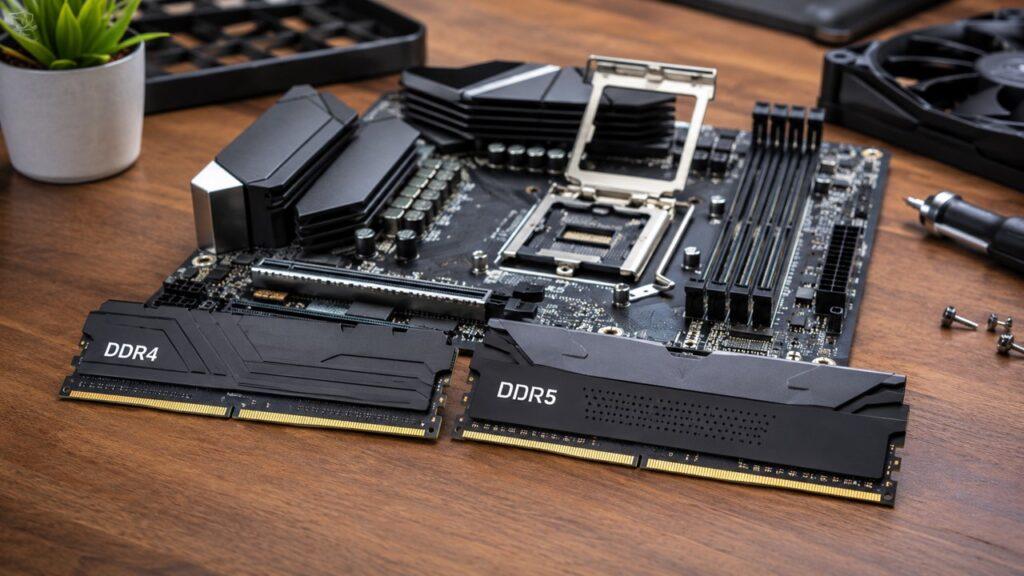
You cannot install DDR5 RAM into a DDR4 slot. DDR4 and DDR5 desktop sticks may both use 288 pins, but they have different notch positions and different electrical designs.
Before buying RAM, always check your motherboard specification page. Do not only check the CPU name because the motherboard decides which physical RAM slot you get.
Is DDR5 Faster Than DDR4 In Real Life?
DDR5 is faster in bandwidth-heavy tasks, but that does not mean every user will notice a big difference. Some workloads benefit a lot. Others barely change.
Everyday Use
For browsing, email, YouTube, streaming, online meetings, Microsoft Office, schoolwork, and light multitasking, good DDR4 can still feel very fast.
If you are a normal user, RAM capacity often matters more than RAM generation. For example, a PC with 32GB DDR4 can feel smoother than a PC with only 8GB DDR5 when you open many browser tabs and apps.
So, if your current PC feels slow, ask this first: do I need more RAM capacity, or do I need a whole new platform?
Gaming
DDR5 can improve gaming performance, but the difference depends on the game and your hardware. If your graphics card is the main bottleneck, DDR5 may not change much. If the game is CPU-heavy, DDR5 can help more.
DDR5 may help gaming by improving:
- Average FPS in some games.
- 1% lows in some CPU-bound titles.
- Frame consistency in high-refresh-rate gaming.
- Performance in simulation and strategy games.
- Performance in some open-world games.
But DDR4 is still fine for budget gaming. If you already have a good DDR4 system, a better GPU or CPU may give you a bigger gaming improvement than switching to DDR5.
For a brand-new gaming PC, DDR5 is the better long-term choice. For an older DDR4 gaming PC, upgrading the platform only for RAM usually does not make sense.
Content Creation And Workstation Tasks
DDR5 is more useful when the workload needs more bandwidth or more capacity. This is where DDR5 starts to feel more meaningful.
DDR5 can help more with:
- Video editing
- 3D rendering
- Large Photoshop projects
- Large Lightroom catalogs
- Code compilation
- Compression and decompression
- Virtual machines
- Local AI workloads
- Large spreadsheets
- Large datasets
- Heavy multitasking
If your work involves large files or professional software, DDR5 has a stronger case. But even here, capacity still matters. A creator with only 16GB DDR5 may still struggle, while 32GB or 64GB gives much more breathing room.
Multitasking
DDR5 helps multitasking most when you also have enough capacity. A 32GB DDR5 system is a strong choice for modern multitasking, but a 32GB DDR4 system can still be very comfortable.
If you keep many tabs, documents, spreadsheets, editing apps, and chat apps open, moving from 16GB to 32GB may help more than changing from DDR4 to DDR5 alone.
DDR4 vs DDR5 For Gaming: Which Is Better?
DDR5 is better for a new gaming PC, but DDR4 can still be the better value for budget gamers. The right choice depends on your platform and budget.
| Gamer Type | Better Choice | Why |
| Budget gamer | DDR4 | Saves money for CPU or GPU |
| New PC builder | DDR5 | Better upgrade path |
| Competitive gamer | DDR5 | Can help 1% lows in some games |
| Casual gamer | Either | Difference may be small |
| AM4 user | DDR4 | AM4 uses DDR4 |
| AM5 user | DDR5 | AM5 uses DDR5 |
If you are already using a good DDR4 gaming PC, do not upgrade to DDR5 only for gaming. You would need a new motherboard and possibly a new CPU, so the total cost can become high.
If you are building from zero, DDR5 is the cleaner choice because it fits modern platforms better.
DDR4 vs DDR5 For Productivity And Office Work
For office work, DDR4 is still enough for most people. Writing, browsing, spreadsheets, online meetings, and email do not usually need extreme memory bandwidth.
Choose DDR4 if:
- You mostly browse the internet.
- You write articles, reports, or documents.
- You use spreadsheets and basic office apps.
- You attend Zoom or Google Meet calls.
- You are upgrading an older business desktop.
- Your current motherboard already supports DDR4.
Choose DDR5 if:
- You are building a new business desktop.
- You edit videos or photos.
- You use heavy design software.
- You run many apps together.
- You want stronger long-term support.
- You need 32GB, 64GB, or more memory.
For office users, the best upgrade is often simple: get enough RAM first. A 32GB DDR4 desktop can feel much better than a low-memory DDR5 system.
DDR4 vs DDR5 For Laptops
Laptop RAM is more complicated than desktop RAM because many laptops now come with soldered memory. That means the RAM is fixed to the motherboard and cannot be upgraded later.
Can You Upgrade Laptop DDR4 To DDR5?
Usually, no. A DDR4 laptop cannot normally be upgraded to DDR5 because the memory type depends on the laptop motherboard, CPU memory controller, BIOS, and slot design.
Even if the laptop has removable RAM, the slot normally supports only one generation. A DDR4 SODIMM slot is not made for DDR5 SODIMM memory.
Should You Buy A DDR5 Laptop?
A DDR5 laptop makes sense if you are buying a newer gaming laptop, creator laptop, premium laptop, or long-term work machine.
Before buying, check these points:
- Choose DDR5, LPDDR5, or LPDDR5X for a newer premium laptop.
- Choose DDR4 if the laptop is cheaper and still powerful enough.
- Check whether the RAM is soldered.
- For long-term use, 16GB should be the practical minimum.
- For creators, 32GB or more is safer.
- For basic school and office work, DDR4 can still be fine.
The most important laptop rule is simple: if the RAM is soldered, buy enough from the beginning.
Can You Use DDR4 And DDR5 Together?
No, you cannot use DDR4 and DDR5 together in a normal PC. Most motherboards support only one memory generation.
Some rare motherboards may have both DDR4 and DDR5 slots, but they usually do not allow both types to run at the same time. In normal builds, you choose one generation based on your motherboard.
If your motherboard says DDR4, buy DDR4. If your motherboard says DDR5, buy DDR5.
Is DDR5 Worth Upgrading From DDR4?
DDR5 is worth it when you are already moving to a new CPU and motherboard. It is usually not worth replacing your whole platform only because you want DDR5.
Upgrade To DDR5 If
Upgrade to DDR5 if:
- You are building a new PC.
- You are moving to AMD AM5.
- You are buying an Intel Core Ultra desktop platform.
- You need 32GB, 64GB, 96GB, or 128GB RAM.
- You edit videos or render 3D projects.
- You code, compile, or run virtual machines.
- You work with AI tools or large datasets.
- You want a better long-term upgrade path.
DDR5 makes the most sense when it comes as part of a full platform upgrade.
Stay With DDR4 If
Stay with DDR4 if:
- Your current PC already performs well.
- You use an AMD AM4 system.
- You already have an Intel DDR4 motherboard.
- You are on a strict budget.
- You mostly play GPU-bound games.
- You only need more RAM capacity.
- You would need to replace the CPU, motherboard, and RAM just to use DDR5.
If your DDR4 PC is still strong, do not rush. You may get better value from adding more RAM, upgrading your SSD, or buying a better graphics card.
The Most Practical Upgrade Rule
If you already have a good DDR4 system, do not upgrade just for DDR5. If you are building a new PC from scratch, choose DDR5 unless your budget clearly points you toward a cheaper DDR4 platform.
DDR4 vs DDR5 Price Difference
DDR4 is usually the better value for older-system upgrades. DDR5 is usually the better value for new mid-range and high-end builds because it connects you to newer platforms.
| Situation | Better Value |
| Upgrading an old PC | DDR4 |
| Building a very cheap PC | Depends on total platform cost |
| Building a new mid-range PC | DDR5 |
| Building a high-end PC | DDR5 |
| Building a workstation | DDR5 |
Do not compare only the price of the RAM kit. Compare the full platform cost. DDR5 may also require a new CPU and motherboard, so the real upgrade cost can be much higher.
DDR4 vs DDR5 Motherboard Compatibility
Motherboard compatibility decides which RAM you can actually install. The CPU memory controller also matters, but the RAM slot on the motherboard is the final answer.
How To Check RAM Compatibility
Follow these steps before you buy RAM:
- Check your CPU model.
- Check your motherboard model.
- Visit the motherboard manufacturer’s specification page.
- Look for DDR4 or DDR5 support.
- Check supported RAM speeds.
- Check maximum memory capacity.
- Check the QVL list if you want better stability.
- Update your BIOS before using very fast RAM kits.
- Buy a matched kit instead of mixing random sticks.
This small check can save you from buying RAM that does not fit or does not run properly.
Why DDR5 Will Not Fit In A DDR4 Slot
DDR5 will not fit in a DDR4 slot because the notch position is different. The electrical design is also different, so the motherboard cannot use the wrong memory type.
Never force RAM into a slot. If it does not line up easily, it is probably the wrong type or facing the wrong direction.
Does CPU Support Matter?
Yes, CPU support matters because the CPU includes the memory controller. But the motherboard decides whether your system physically uses DDR4 or DDR5.
This is especially important with Intel 12th, 13th, and 14th Gen desktop CPUs. Some boards use DDR4, while others use DDR5. You cannot assume support by CPU name alone. Always check the exact motherboard model.
DDR4 vs DDR5 RAM Speed: What Numbers Actually Matter?
RAM numbers can look confusing at first. You may see MT/s, MHz, CL, capacity, dual-channel, XMP, and EXPO. You do not need to be an expert, but you should understand the basics before buying.
MT/s Vs MHz
MT/s means million transfers per second. It is the more accurate way to describe DDR memory speed because DDR memory transfers data twice per clock cycle.
People often say MHz when talking about RAM, but MT/s is more accurate. For example, DDR5-6000 means the memory is rated for 6000 MT/s.
CAS Latency
CAS latency, often shown as CL, tells you how many memory clock cycles the RAM takes to respond to a request.
Lower CL can be good, but it is not enough by itself. A DDR4 CL16 kit and a DDR5 CL40 kit are running at different speeds, so you must compare both timing and transfer rate.
The easy rule is this: do not buy RAM based only on CL. Look at speed, capacity, compatibility, and platform support too.
Capacity
Capacity is often more important than speed for normal users. If your PC runs out of RAM, it starts using storage as temporary memory, which feels much slower.
Use these simple capacity targets:
- 8GB: only for very basic use.
- 16GB: practical minimum for normal users.
- 32GB: better for gaming, multitasking, and content creation.
- 64GB or more: useful for editing, virtual machines, 3D work, AI, and professional workloads.
For most people building a new PC today, 32GB is the comfortable choice if the budget allows.
Dual Channel
Two RAM sticks are usually better than one because they allow the system to use dual-channel memory.
For example, 2 x 16GB is usually better than 1 x 32GB in a desktop PC. Both give you 32GB total, but the two-stick setup usually gives the CPU more memory bandwidth.
This can help with gaming, integrated graphics, and some productivity workloads.
Best RAM Capacity For DDR4 And DDR5 Builds
The best RAM capacity depends on what you do with your computer. Do not buy RAM only because the speed number looks high. Buy enough capacity for your real workload.
| User Type | Recommended DDR4 Capacity | Recommended DDR5 Capacity |
| Basic office user | 16GB | 16GB |
| Student | 16GB | 16GB |
| Casual gamer | 16GB to 32GB | 32GB |
| Heavy gamer | 32GB | 32GB |
| Content creator | 32GB to 64GB | 32GB to 64GB or more |
| Workstation user | 64GB if supported | 64GB to 128GB or more |
| Long-term new build | Only if budget-focused | 32GB minimum preferred |
For most new builds in 2026, 32GB DDR5 is a strong sweet spot. For older DDR4 systems, 16GB is still usable, but 32GB feels much better for gaming, browsing, and multitasking.
Common DDR4 And DDR5 Buying Mistakes
RAM mistakes are easy to make because the names look similar. Here are the common ones to avoid:
- Buying DDR5 for a DDR4 motherboard.
- Buying DDR4 for an AMD AM5 build.
- Choosing RAM speed without checking motherboard support.
- Buying one stick instead of a matched two-stick kit.
- Mixing different RAM kits.
- Ignoring BIOS updates.
- Forgetting to enable XMP or EXPO.
- Choosing RGB over capacity and compatibility.
- Paying too much for extreme RAM speeds you may not notice.
- Confusing laptop RAM with desktop RAM.
- Thinking DDR5 automatically doubles FPS.
- Buying only 8GB because the RAM is newer.
The safest buying habit is simple: check your motherboard first, then choose capacity, then choose speed.
DDR4 vs DDR5: Pros And Cons
DDR4 and DDR5 are both useful, but they fit different buyers. DDR4 is better for value upgrades. DDR5 is better for new builds and long-term use.
DDR4 Pros And Cons
| Pros | Cons |
| Usually cheaper for older builds | Older standard |
| Great for budget upgrades | Lower bandwidth |
| Mature and stable | Less future-proof |
| Still good for gaming | Lower maximum capacity |
| Works with AMD AM4 and many Intel boards | Not supported by newer platforms like AM5 |
DDR5 Pros And Cons
| Pros | Cons |
| Higher bandwidth | Platform upgrade can cost more |
| Better future support | Needs a DDR5 motherboard |
| Higher capacity options | Higher CAS latency numbers |
| Better for heavy workloads | Not always a huge gaming upgrade |
| Lower standard voltage | Fast kits may need BIOS tuning |
DDR4 vs DDR5: Which One Should You Choose?
The easiest way to choose is to start with your motherboard. If your motherboard supports DDR4, buy DDR4. If your motherboard supports DDR5, buy DDR5. If you are building a new PC, DDR5 is usually the better direction.
Choose DDR4 If
Choose DDR4 if:
- You are upgrading an older PC.
- Your motherboard only supports DDR4.
- You are building a very low-cost system.
- You mostly do office work, browsing, and casual gaming.
- You want to spend more money on the CPU or GPU.
- You already have a stable DDR4 system.
- You only need more RAM capacity.
Choose DDR5 If
Choose DDR5 if:
- You are building a new PC.
- You are choosing AMD AM5.
- You are choosing Intel Core Ultra desktop.
- You want better long-term support.
- You need higher RAM capacity.
- You edit videos, render, code, or use AI tools.
- You want a stronger platform for future upgrades.
- You want smoother high-refresh gaming where memory performance matters.
Final Verdict
DDR5 is better than DDR4 on paper and in many modern workloads. It gives you more bandwidth, better capacity options, lower standard voltage, and stronger support for newer CPUs and motherboards.
But DDR4 is still a smart choice if you already own a DDR4 system or want a low-cost upgrade. Many users will get better value by adding more DDR4 RAM instead of replacing the CPU, motherboard, and memory just to move to DDR5.
So here is the simple answer: choose DDR5 for a brand-new PC. Stay with DDR4 if your current system still performs well and only needs a practical memory upgrade.
Related FAQs
Is DDR5 Better Than DDR4?
Yes, DDR5 is better in bandwidth, capacity, efficiency, and future platform support. However, DDR4 is still useful for older PCs and budget upgrades.
Can I Put DDR5 RAM In A DDR4 Motherboard?
No, you cannot put DDR5 RAM in a DDR4 motherboard. The slot notch and electrical design are different.
Is DDR5 Worth It For Gaming?
DDR5 is worth it for a new gaming PC, especially on modern platforms. But if you already have a good DDR4 gaming PC, upgrading only for DDR5 is usually not worth the cost.
Does DDR5 Increase FPS?
Sometimes, DDR5 can increase FPS in CPU-bound games and improve 1% lows. But the GPU and CPU usually affect gaming performance more than RAM generation.
Is 16GB DDR5 Better Than 32GB DDR4?
Not always. For multitasking, gaming, and content creation, 32GB DDR4 can feel better than 16GB DDR5 because capacity often matters more than generation.
Which Is Better For Video Editing, DDR4 Or DDR5?
DDR5 is better for video editing because it offers higher bandwidth and better high-capacity options. Still, having enough RAM is more important than choosing DDR5 with too little capacity.
Do AMD AM5 Motherboards Support DDR4?
No, AMD AM5 motherboards support DDR5 memory. If you are building an AM5 system, you need DDR5 RAM.
Do Intel Motherboards Support Both DDR4 And DDR5?
Some Intel 12th, 13th, and 14th Gen desktop CPUs can support DDR4 or DDR5, but the motherboard usually supports only one type. Always check the exact motherboard model.
Can I Mix DDR4 And DDR5 RAM?
No, you cannot mix DDR4 and DDR5 RAM in a normal PC. Most motherboards support only one generation at a time.
Should I Upgrade From DDR4 To DDR5 Now?
Upgrade to DDR5 if you are already building a new PC or changing your motherboard and CPU. Stay with DDR4 if your current system is fast enough and only needs more memory.

Justin has spent years learning how blogs, websites, hosting, and online income work in the real world. Along with blogging and SEO, he also covers desktops, laptops, PC parts, and everyday tech, sharing easy-to-understand advice for readers who want to build better websites and choose better tools.