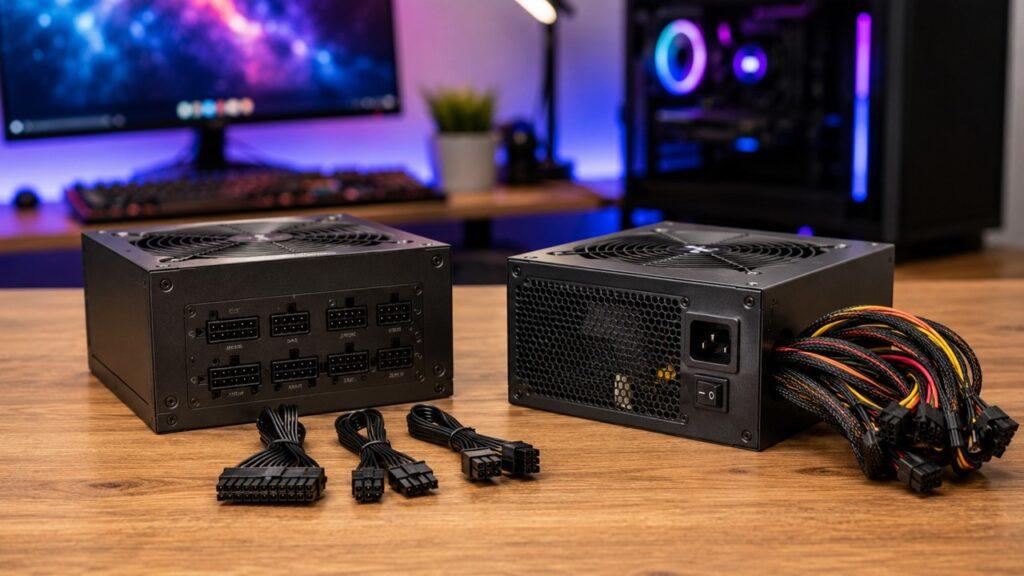
A modular power supply lets you connect only the cables your PC needs, while a non-modular power supply comes with every cable permanently attached. The main difference is not gaming performance or raw power delivery. It is cable management, airflow, installation comfort, upgrade flexibility, and price.
In this guide, we’ll compare modular, semi-modular, and non-modular PSUs in a simple way. I’ll also show you which one makes sense for gaming PCs, office builds, small cases, high-end GPUs, and budget setups.
Key Takeaways
- A modular PSU gives you the cleanest cable management.
- A non-modular PSU is cheaper, but unused cables stay inside the case.
- A semi-modular PSU offers the best balance for many mid-range builds.
- Modularity does not directly improve FPS, CPU speed, or GPU performance.
- Cleaner cabling can help airflow, especially in small or crowded cases.
- PSU quality matters more than whether the cables are modular.
- Never mix modular PSU cables from another brand or model unless the manufacturer confirms compatibility.
- For newer high-end GPUs, check for native 12VHPWR or 12V-2×6 cable support.
- If the price difference is small, modular is usually easier to live with.
- If the budget is very tight, a good non-modular PSU is still better than a cheap modular one.
Modular vs Non-Modular Power Supply: Quick Comparison
Before we go deeper, here’s the simple comparison. This table gives you the practical difference between fully modular, semi-modular, and non-modular power supplies.
| Feature | Fully Modular PSU | Semi-Modular PSU | Non-Modular PSU |
| Cable Design | Every cable is removable | Main cables are fixed, extra cables are removable | All cables are permanently attached |
| Cable Management | Excellent | Good | Harder |
| Airflow Potential | Best | Better than non-modular | Depends on case space |
| Installation | Clean and flexible | Balanced | Simple but bulky |
| Upgrade Flexibility | High | Medium | Low |
| Aesthetics | Best for glass cases | Clean enough for most builds | Can look cluttered |
| Price | Usually highest | Mid-range | Usually cheapest |
| Best For | Gaming PCs, workstations, small cases, premium builds | Mid-range gaming and productivity PCs | Budget, office, and simple home PCs |
The easiest way to think about it is this: modular PSUs give you more control, while non-modular PSUs save money.
What Is a Modular Power Supply?
A modular power supply is a PSU where the power cables can be removed from the power supply unit. Instead of dealing with one large bundle of cables, you connect only the cables your computer actually needs.
This is useful because every PC build is different. A simple office PC may need only a motherboard cable, CPU cable, and one SATA power cable. A gaming PC may need extra PCIe GPU cables, more SATA cables, and maybe a newer 12VHPWR or 12V-2×6 cable.
Fully Modular PSU
A fully modular PSU has no permanently attached cables. Every cable can be plugged in or removed.
That means the 24-pin motherboard cable, CPU EPS cable, GPU PCIe cable, SATA cable, Molex cable, and newer GPU power cables are all detachable. You choose the cables you need and leave the rest in the box.
This makes the build process cleaner. You do not have to hide unused cables inside the case. You also have more freedom when routing cables behind the motherboard tray or through cable cutouts.
Benefits of a Fully Modular PSU
- Cleaner cable management
- Better-looking PC interior
- Easier installation in tight spaces
- Less cable clutter near fans and components
- Better airflow potential
- Easier upgrades later
- Easier troubleshooting
- Better support for custom cables
- Ideal for tempered-glass PC cases
- Useful for small-form-factor builds
A fully modular PSU is especially helpful when you care about the inside of your build. If your case has a glass side panel, messy cables are very visible. A modular unit helps keep everything neat.
It is also useful when you upgrade often. For example, if you add more SSDs later, you can connect another SATA power cable. If you remove a hard drive, you can remove that cable completely.
Downsides of a Fully Modular PSU
- Usually more expensive
- Unused cables can be lost
- Replacement cables must be compatible
- Wrong cables can damage components
- Some beginners may plug in more cables than needed
The biggest warning is cable compatibility. Modular PSU cables are not automatically universal. Corsair explains that component-side connectors are standardized, but the PSU-side wiring can differ by manufacturer. So a cable that physically fits can still be wired differently.
That is why you should always use the cables that came with your power supply, or buy officially compatible cables.
What Is a Non-Modular Power Supply?
A non-modular power supply comes with all cables permanently attached. You cannot remove any of them, even if your PC does not need every cable.
This older design is still common because it is simple and affordable. You install the PSU, connect the cables you need, and tuck the unused cables somewhere inside the case.
Why Non-Modular PSUs Still Exist
- They are cheaper to manufacture.
- They are usually cheaper to buy.
- They are simple for basic builds.
- There are no detachable PSU-side cable ports.
- They are common in budget and office desktops.
- They work fine when the case has enough cable space.
A non-modular PSU is not automatically bad. The cable design is less convenient, but the actual quality depends on the PSU model itself.
A high-quality non-modular PSU is much safer than a low-quality modular PSU. So do not judge a power supply only by whether the cables detach.
Benefits of a Non-Modular PSU
- Usually the cheapest option
- Simple installation for basic PCs
- No cable bag to manage
- No risk of losing detachable cables
- Fine for office computers
- Good enough for many budget builds
- Works well in large cases with PSU shrouds
If you are building a simple PC for browsing, schoolwork, documents, streaming, or light daily use, a non-modular PSU can make sense. You probably will not care much about the extra cables once the case is closed.
Downsides of a Non-Modular PSU
- Extra cables stay inside the case.
- Cable management is harder.
- Airflow can be worse in cramped cases.
- The build can look messy.
- Upgrades can be more annoying.
- Small cases can feel crowded.
- Unused cables may block fans or drive bays.
The biggest problem is space. If your case is small, every unused cable becomes annoying. You may have to fold, tie, and hide extra cables behind the motherboard tray or under the PSU shroud.
That does not always hurt performance, but it can make the build harder to work on.
What Is a Semi-Modular Power Supply?
A semi-modular power supply sits between fully modular and non-modular. Some important cables are permanently attached, while the extra cables are removable.
This design works well because almost every PC needs the main motherboard and CPU cables anyway. So manufacturers keep those attached and make optional cables removable.
Common Fixed Cables in Semi-Modular PSUs
- 24-pin motherboard cable
- 8-pin CPU/EPS cable
- Sometimes one PCIe GPU cable
These fixed cables are usually required in most builds. So having them permanently attached is not a big issue for many users.
Common Removable Cables in Semi-Modular PSUs
- Extra PCIe GPU cables
- SATA power cables
- Molex cables
- Extra peripheral cables
- Accessory cables
This means you can still avoid some unnecessary clutter. For example, if your build has only one M.2 SSD and no SATA drives, you may not need any SATA power cable at all.
Who Should Choose a Semi-Modular PSU?
A semi-modular PSU is a great middle-ground choice. It gives you cleaner cable management than a non-modular PSU without the higher price of a fully modular unit.
For many mid-range gaming PCs, this is the sweet spot. You get fewer unused cables, easier routing, and a cleaner build. But you usually do not pay as much as you would for a fully modular model.
If you want value, this is often the PSU type I would look at first.
Modular vs Non-Modular PSU: What Is the Real Difference?
The real difference between a modular and non-modular PSU is cable control. It is not about how much power the PSU can deliver.
Two power supplies can have the same wattage, same efficiency rating, and similar internal quality. One may be modular, and the other may be non-modular. If both are well-built, both can power the same PC safely.
The difference is how easy they are to install, route, clean, upgrade, and manage.
- Modular PSUs let you remove unused cables.
- Non-modular PSUs force you to keep unused cables inside the case.
- Semi-modular PSUs keep essential cables attached and remove optional ones.
- Modularity improves convenience, not raw power.
- PSU quality matters more than cable design.
So when someone asks, “Is a modular PSU better?” the honest answer is: it is better for cable management, but not automatically better in quality.
Does a Modular PSU Improve Performance?
A modular PSU does not directly improve PC performance. It will not increase FPS, reduce game loading times, boost CPU speed, or make your graphics card stronger.
Your components perform based on the power quality, wattage headroom, cooling, drivers, and hardware capability. The cable design alone does not make the system faster.
However, a modular PSU can indirectly help the overall build environment. By removing unused cables, you can reduce clutter inside the case. That can help airflow, especially if your case is small or your GPU produces a lot of heat.
So the answer is simple: modular does not improve performance directly, but it can help your build stay cleaner and easier to cool.
Does a Modular PSU Improve Airflow and Cooling?
A modular PSU can improve airflow in some PC builds because you do not need to keep unused cables inside the case. But the size of the benefit depends on the case layout.
If your case has a large PSU shroud, deep cable-routing space, and strong front airflow, the difference may be small. But in a compact case, unused cables can block fans, press against panels, or crowd the GPU area.
- Biggest airflow benefit: small-form-factor cases
- Strong benefit: compact gaming PCs with large GPUs
- Moderate benefit: mid-tower cases with limited cable space
- Small benefit: large cases with good cable routing
- Minimal benefit: simple office PCs with low heat output
So yes, modular cables can help airflow. But they are not a magic cooling upgrade. Good case fans, clean dust filters, proper GPU clearance, and smart cable routing still matter more.
Is a Modular PSU More Reliable Than a Non-Modular PSU?
A modular PSU is not automatically more reliable than a non-modular PSU. Reliability mainly depends on the internal design and build quality.
A good power supply should have stable voltage delivery, quality capacitors, proper thermal design, a good fan, and important protection features. The warranty period and professional reviews also matter.
A cheap modular PSU can still be risky if it uses poor internal parts. At the same time, a well-made non-modular PSU can be reliable for years.
This is why you should not buy a PSU only because it is modular. First, choose a safe and reputable model. Then decide whether modular, semi-modular, or non-modular makes sense for your build.
Modular PSU Cable Safety: Do Not Mix Cables
This is one of the most important parts of the whole article. Modular PSU cables are not universal across every power supply.
The connector may look the same, but the wiring on the PSU side can be different. Seasonic also warns that modular cables are not cross-brand compatible and that incompatible cables can cause component damage, fire hazards, or warranty issues.
So do not treat modular PSU cables like normal USB cables. They are not that simple.
- Use the cables that came with your PSU.
- Do not reuse old modular cables without checking compatibility.
- Do not mix cables from different PSU brands.
- Do not assume the cable is safe because it fits.
- Check the official cable compatibility chart.
- Be careful with SATA, PCIe, and GPU power cables.
- Store unused PSU cables in a labeled bag or box.
This matters even more if you are upgrading. Many people replace the PSU but keep the old cables because they do not want to redo cable management. That can be a very expensive mistake.
If you buy a new modular PSU, use the new cables unless the manufacturer clearly says your old cables are compatible.
PSU Cable Types You Need to Know
To choose the right PSU type, you should understand the main cables inside a PC. This makes installation easier and helps you avoid buying a unit that does not match your build.
24-Pin Motherboard Cable
The 24-pin motherboard cable is the main power cable for the motherboard. Every standard desktop PC build needs it.
On a fully modular PSU, this cable is detachable. On most semi-modular PSUs, it is usually fixed. On a non-modular PSU, it is permanently attached with all the other cables.
This cable is thick, so routing it neatly can take some patience.
8-Pin CPU/EPS Cable
The CPU power cable connects near the top of the motherboard and powers the processor. Many motherboards use one 8-pin EPS connector, while some high-end boards use an extra 4-pin or 8-pin connector.
This cable can be tricky to route after the motherboard is installed. So it is often easier to route it before installing a large CPU cooler.
PCIe GPU Power Cable
PCIe power cables are used for graphics cards. Depending on the GPU, you may need one 6-pin, one 8-pin, multiple 8-pin connectors, or a newer high-power connector.
Gaming PCs need careful attention here. A weak or under-equipped PSU may not have the right GPU cables for future upgrades.
If you plan to buy a stronger graphics card later, check the PCIe cable count before buying the PSU.
12VHPWR and 12V-2×6 GPU Cable
Some newer graphics cards use a 12VHPWR or 12V-2×6 power connector instead of multiple traditional 8-pin PCIe cables.
ATX 3.1 design guidance includes support around newer connector requirements, and Intel’s public ATX 3.x design guide aligns with ATX Specification Version 3.1. Cooler Master also describes 12V-2×6 as the newer cable type used in ATX 3.1.
If you are building a high-end gaming PC, it is usually better to buy a modern PSU with native support for your GPU connector. That is cleaner than relying on bulky adapters.
SATA Power Cable
SATA power cables are used for SSDs, hard drives, fan hubs, RGB controllers, and some accessories.
If your PC uses only M.2 SSDs, you may not need SATA power cables at all. This is one reason modular PSUs are convenient. You can simply leave SATA cables out unless your build needs them.
Molex Cable
Molex is an older peripheral power connector. It is not as common in modern builds, but some fans, pumps, lighting kits, and accessories still use it.
In many modern PCs, Molex cables are unused. With a modular PSU, you can leave them out. With a non-modular PSU, you need to hide them inside the case.
Fully Modular vs Semi-Modular vs Non-Modular PSU
Now let’s make the decision easier. Each PSU type has a clear audience, and the best choice depends on your PC build, not just the label on the box.
Choose a Fully Modular PSU If
- You are building a gaming PC.
- You have a small PC case.
- You care about clean cable management.
- You want a neat tempered-glass build.
- You plan to upgrade your GPU later.
- You use multiple drives or accessories.
- You want custom cable options.
- You are building a high-end workstation.
- You want the easiest future maintenance.
- The price difference is not too high.
A fully modular PSU makes the most sense when the PC is powerful, expensive, compact, or visually important.
If you are already spending money on a good GPU, a clean case, and quality cooling, it makes sense to choose a PSU that is easier to manage.
Choose a Semi-Modular PSU If
- You want good cable management at a lower price.
- You are building a mid-range gaming PC.
- You do not need full custom cable control.
- You want fewer unused cables.
- You are using a normal mid-tower case.
- You want better value than fully modular.
- You are okay with fixed motherboard and CPU cables.
For many users, semi-modular is the practical choice. The main cables are required anyway, so having them fixed is not a big problem.
You still remove optional cables, which is where most of the clutter usually comes from.
Choose a Non-Modular PSU If
- You are on a strict budget.
- You are building an office PC.
- You are building a simple home computer.
- Your case has enough room for extra cables.
- You do not care about the internal look.
- You do not plan many upgrades.
- You found a good-quality model at a fair price.
A non-modular PSU is not wrong. It is just less flexible.
If the PC will sit under a desk and handle basic work, you may not need to pay extra for modular cables. Just make sure the PSU itself is safe and reliable.
Modular vs Non-Modular PSU for Different PC Builds
Different PC builds need different priorities. A gaming PC, office PC, and workstation do not always need the same type of power supply.
| PC Build Type | Recommended PSU Type | Why |
| Basic Office PC | Non-modular | Cheapest and good enough for simple systems |
| Student/Home PC | Non-modular or semi-modular | Depends on budget and case space |
| Budget Gaming PC | Semi-modular | Better cable control without premium pricing |
| Mid-Range Gaming PC | Semi-modular or fully modular | Easier GPU and storage upgrades |
| High-End Gaming PC | Fully modular | Best routing and connector flexibility |
| Small-Form-Factor PC | Fully modular | Less cable clutter in tight spaces |
| Workstation PC | Fully modular | Better for powerful GPUs and multiple drives |
| RGB/Glass Case Build | Fully modular | Best appearance and custom cable support |
| Prebuilt PC Replacement | Depends on case and connectors | Compatibility matters more than cable style |
If you are unsure, choose based on your case size and upgrade plans. Small case plus future GPU upgrade? Go modular. Big case plus basic office use? Non-modular is fine.
Installation Differences: Modular vs Non-Modular PSU
The installation process is not difficult, but the cable style changes how neat and comfortable the job feels. Modular PSUs give you more control, while non-modular PSUs require more cable hiding.
Installing a Modular PSU
- Mount the PSU inside the case.
- Make sure the fan faces the correct direction.
- Connect only the cables your build needs.
- Route the CPU cable before tight areas become blocked.
- Connect the 24-pin motherboard cable.
- Connect the CPU EPS cable.
- Connect GPU power cables if needed.
- Connect SATA power cables if you use SATA drives.
- Tie cables behind the motherboard tray.
- Store unused cables safely for future upgrades.
The best part is that you can route cables one by one. This makes the build less messy, especially for beginners.
Installing a Non-Modular PSU
- Mount the PSU inside the case.
- Separate the cables you actually need.
- Route the motherboard and CPU cables first.
- Connect GPU and SATA cables if required.
- Bundle unused cables neatly.
- Hide extra cables under the PSU shroud if possible.
- Keep cables away from fans.
- Avoid blocking front intake airflow.
- Use Velcro straps or zip ties.
- Check that no cable touches fan blades.
The main challenge is hiding unused cables. Take your time here. A messy cable bundle can make future cleaning and upgrades more frustrating.
Common Mistakes When Choosing a PSU Type
Many beginners focus only on modularity and forget the bigger picture. That can lead to the wrong purchase.
- Buying a modular PSU from a low-quality brand
- Choosing too little wattage for future upgrades
- Ignoring GPU power cable requirements
- Mixing modular cables from another PSU
- Buying non-modular for a very cramped case
- Assuming 80 PLUS alone means high quality
- Losing unused modular cables
- Forgetting about case cable-routing space
- Choosing looks over safety
- Ignoring PSU warranty and protection features
The most common mistake is thinking modular means premium by default. It does not.
A PSU can be modular and still be poorly made. Always check the full PSU quality, not just the cable design.
What Matters More Than Modularity?
Modularity is useful, but it should not be the first thing you check. A power supply is the electrical foundation of your PC, so quality comes first.
Wattage Headroom
Your PSU needs enough wattage for the CPU, GPU, motherboard, drives, fans, and future upgrades.
Do not buy the lowest wattage that barely works. A little headroom helps the PSU run more comfortably. It also gives you room for a future GPU or storage upgrade.
For gaming PCs, the graphics card usually decides the PSU requirement. Always check the GPU manufacturer’s recommended PSU wattage and connector needs.
Efficiency Rating
Efficiency rating tells you how efficiently the PSU converts wall power into usable power for your PC. Common ratings include Bronze, Gold, Platinum, and Titanium.
A higher efficiency unit usually wastes less energy as heat. It may also run cooler and quieter, depending on the model.
However, efficiency rating is not the whole story. An 80 PLUS Gold unit from a weak platform is not automatically better than every Bronze unit. You still need to consider build quality and reviews.
Build Quality
Build quality matters more than cable design. A reliable PSU should have good internal components, stable voltage regulation, proper thermal design, and a dependable fan.
This is why two PSUs with the same wattage can be very different. One may be safe for a gaming PC, while another may struggle under load.
When possible, choose a PSU from a reputable series with strong professional reviews.
Protection Features
A good PSU should include important safety protections.
- OCP: Over-current protection
- OVP: Over-voltage protection
- UVP: Under-voltage protection
- OPP: Over-power protection
- SCP: Short-circuit protection
- OTP: Over-temperature protection
These protections help reduce the chance of damage during electrical faults, overheating, overloads, or short circuits.
Do not skip safety just to save a few dollars. A bad PSU can risk the entire PC.
ATX 3.0, ATX 3.1, and GPU Connector Support
If you are building a modern gaming PC, check the PSU’s ATX standard and GPU cable support.
Newer power supplies may include native 12VHPWR or 12V-2×6 cables for modern graphics cards. That can make the build cleaner and reduce adapter clutter.
This does not mean everyone needs ATX 3.1. A basic office PC or older GPU build may not need it. But for a new high-end GPU build, it is worth checking.
Warranty and Brand Reputation
A longer warranty can be a good sign, but it is not the only thing that matters.
Look at the exact model, not just the brand. Many brands sell both strong and weak PSU models. A reputable brand name helps, but model-level quality is what really matters.
If you are choosing between two similar units, the one with better reviews, better warranty, and proper cables is usually the safer pick.
Is a Modular PSU Worth It?
Yes, a modular PSU is worth it for many modern PC builds. It makes installation cleaner, reduces unused cable clutter, improves the look of the build, and makes upgrades easier.
But it is not always necessary. If you are building a low-cost office PC, a good non-modular PSU can be perfectly fine.
A modular PSU is worth it when:
- You are building a gaming PC.
- You have a small case.
- You care about cable management.
- You want a clean glass-panel build.
- You plan future upgrades.
- You use a large GPU.
- The price difference is small.
A modular PSU may not be worth it when:
- Your budget is very tight.
- The PC is only for basic office work.
- Your case has plenty of cable space.
- You do not care about appearance.
- You would have to choose a lower-quality PSU just to get modular cables.
My simple advice is this: never sacrifice PSU quality just to get modular cables.
If you can afford both quality and modularity, go modular. If you must choose between quality and modularity, choose quality.
Final Verdict
Choose a fully modular PSU if you want the cleanest build, easier installation, better cable control, and more upgrade flexibility. It is the best choice for gaming PCs, small cases, premium builds, workstations, and systems with powerful GPUs.
Choose a semi-modular PSU if you want a practical balance between price and cable management. For many mid-range gaming and productivity PCs, this is the best value choice.
Choose a non-modular PSU if you are building a simple office PC, home computer, or budget system where price matters more than appearance. Just make sure the PSU itself is reliable, safe, and powerful enough for your components.
The final answer is simple: modular is better for convenience, but PSU quality matters more than modularity.
Related FAQs
Is a Modular Power Supply Better Than a Non-Modular Power Supply?
A modular power supply is better for cable management, airflow potential, aesthetics, and upgrades. However, it is not automatically better in electrical quality. A high-quality non-modular PSU can still be safer than a cheap modular PSU.
Does a Modular PSU Give Better FPS?
No, a modular PSU does not directly increase FPS. It does not make your CPU or GPU faster. It can only help indirectly by making cable management cleaner and airflow easier to control.
Is a Non-Modular PSU Bad?
No, a non-modular PSU is not bad by default. It is just less convenient because all cables stay attached. For office PCs, simple home computers, and budget builds, a reliable non-modular PSU can work very well.
Is Semi-Modular Better Than Fully Modular?
Semi-modular is not better in flexibility, but it can be better in value. It gives you cleaner cable management than non-modular without the higher price of fully modular For many mid-range PCs, semi-modular is the most practical option.
Can I Use Modular PSU Cables From Another PSU?
No, you should not use modular PSU cables from another PSU unless the manufacturer confirms compatibility Modular cable pinouts are not universal, and using the wrong cable can damage components. Corsair and Seasonic both warn users to check cable compatibility carefully.
Does a Modular PSU Help With Airflow?
Yes, it can help with airflow because you can remove unused cables from the case. The benefit is usually bigger in small cases, compact gaming builds, and systems with large graphics cards.
Are Fully Modular PSUs Harder to Install?
No, fully modular PSUs are usually easier to install neatly. You can connect and route only the cables you need. The only thing you must be careful about is using the correct cables for that exact PSU.
Should I Buy a Modular PSU for a Budget PC?
Only if the price difference is small. For a tight budget, PSU quality should come first A good non-modular PSU is better than a poor-quality modular PSU.
What Is the Main Disadvantage of a Modular PSU?
The main disadvantage is price. Modular PSUs usually cost more than non-modular models You also need to keep track of unused cables because you may need them for future upgrades.
What PSU Type Is Best for a Gaming PC?
A fully modular PSU is ideal for most gaming PCs because it gives the cleanest cable management and easiest GPU upgrade path. However, a semi-modular PSU is often the best value for budget and mid-range gaming builds.
What PSU Type Is Best for a Small PC Case?
A fully modular PSU is usually best for small PC cases. It lets you avoid unnecessary cables in tight spaces This makes routing easier and helps keep airflow paths clearer.
Does a Non-Modular PSU Affect Cooling?
It can affect cooling if unused cables block airflow or crowd the case. This is more likely in small or poorly designed cases. In a large case with good cable space, the cooling difference may be small.
Should I Choose Modular or Non-Modular for an Office PC?
For a basic office PC, a non-modular PSU is usually fine. Office systems normally do not need many cables or frequent upgrades. Just choose a reliable PSU with enough wattage and proper safety protections.
Are Custom PSU Cables Safe?
Custom PSU cables can be safe if they are made for your exact PSU model or officially confirmed compatible. Do not buy random custom cables without checking compatibility first.
Is PSU Modularity More Important Than Wattage?
No, wattage is more important than modularity. Your PSU must have enough power for your components. After wattage and quality are covered, then you can decide whether modular cables are worth the extra cost.

Justin has spent years learning how blogs, websites, hosting, and online income work in the real world. Along with blogging and SEO, he also covers desktops, laptops, PC parts, and everyday tech, sharing easy-to-understand advice for readers who want to build better websites and choose better tools.