Air cooling is the better choice for most PC builders because it is affordable, reliable, easy to install, and strong enough for normal gaming, office work, and everyday use. Liquid cooling is better for high-end CPUs, long heavy workloads, overclocking, quieter sustained performance, and cleaner-looking PC builds.
In this article, we will compare air cooling vs liquid cooling in a simple way. We will cover how both cooling types work, their pros and cons, performance, noise, cost, lifespan, maintenance, safety risks, gaming use, content creation, small PC cases, and which one you should choose.
Key Takeaways
- Air cooling is best for most users because it offers strong cooling at a lower price.
- Liquid cooling is better for high-end CPUs that produce more heat during gaming, rendering, streaming, or overclocking.
- Air coolers usually last longer because they have fewer moving parts and no pump.
- AIO liquid coolers can be quieter under heavy load, but they cost more and have more failure points.
- Custom liquid cooling is mainly for enthusiasts, not beginner PC builders.
- Cooling does not directly increase FPS unless your CPU was overheating or thermal throttling before.
- The right cooler depends on your CPU, case size, airflow, budget, noise preference, and build style.
Air Cooling vs Liquid Cooling: Quick Comparison
Both air cooling and liquid cooling do the same basic job: they move heat away from your CPU so it can run safely. The difference is how they move that heat, how much they cost, how easy they are to install, and which type of PC build they fit best.
| Feature | Air Cooling | Liquid Cooling |
| Cooling Method | Heat pipes, heatsink, and fan | Pump, coolant, tubes, radiator, and fans |
| Best For | Budget, mid-range, reliable builds | High-end CPUs, overclocking, premium builds |
| Price | Usually cheaper | Usually more expensive |
| Installation | Easier | Slightly harder for AIO, much harder for custom loops |
| Maintenance | Very low | Low for AIO, higher for custom loops |
| Lifespan | Often longer | Limited by pump and coolant lifespan |
| Noise | Can get louder under heavy load | Often quieter under sustained load |
| Performance | Great for most CPUs | Better for high thermal loads |
| Case Compatibility | Needs CPU cooler height clearance | Needs radiator mounting space |
| Visual Appeal | Bulkier around the CPU socket | Cleaner and more premium-looking |
| Main Risk | Fan failure or dust buildup | Pump failure or rare leak risk |
| Beginner Friendly | Yes | AIO is manageable, custom loop is not |
| Best Overall Choice | Most users | High-end and enthusiast users |
What Is Air Cooling?
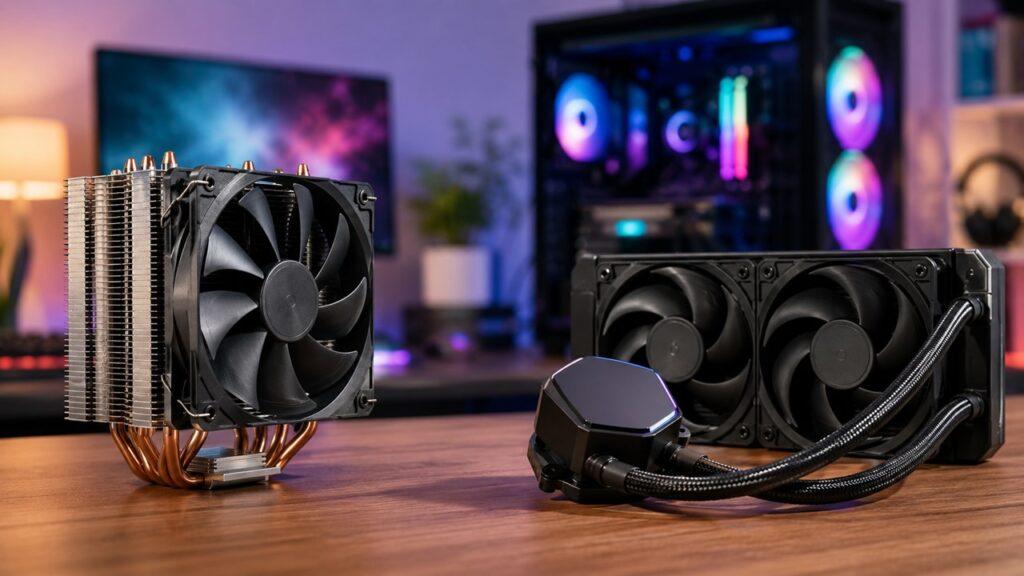
Air cooling is the traditional way to cool a CPU. It uses a metal baseplate, heat pipes, a heatsink, and one or more fans to move heat away from the processor.
Here is the simple version. Your CPU creates heat while it works. That heat moves into the cooler’s metal base, travels through heat pipes, spreads across the heatsink fins, and then a fan pushes the warm air away.
Air coolers are popular because they are simple, affordable, and dependable. You do not have to worry about pumps, coolant, tubes, or leaks. In most cases, the only moving part is the fan.
Air coolers come in different sizes. Some are small low-profile coolers for compact cases. Others are large single-tower or dual-tower coolers built for stronger CPUs. A good tower air cooler can handle many gaming and productivity PCs without any problem.
How Does Air Cooling Work?
An air cooler may look simple from the outside, but it follows a clear heat-transfer process. Each part has a job, from the thermal paste under the cooler to the case fans that finally remove warm air from the system.
Heat Transfers From The CPU To The Baseplate
The CPU has a metal top called the heat spreader. When the processor runs, heat moves into this metal surface.
A thin layer of thermal paste sits between the CPU and the cooler. This paste fills tiny gaps between both surfaces, helping heat move more efficiently into the cooler’s baseplate.
Heat Pipes Move Heat To The Heatsink
Most tower air coolers use heat pipes. These pipes move heat away from the baseplate and into the heatsink fins.
The heatsink is usually made of many thin metal fins. These fins create a large surface area, which helps heat spread out instead of staying trapped near the CPU.
The Fan Pushes Warm Air Away
The fan attached to the heatsink pushes air through the metal fins. As air passes through, it carries heat away from the cooler.
This is why fan quality matters. A better fan can move air efficiently without becoming too loud.
Case Airflow Removes The Heat
The CPU cooler does not work alone. Once the warm air leaves the heatsink, your case fans need to move that air out of the case.
Good intake and exhaust airflow can make a big difference. Even a strong air cooler can struggle inside a case with poor airflow.
Pros And Cons Of Air Cooling
Air cooling is often the easiest recommendation for regular PC builders. Still, it is not perfect for every setup. Let’s look at where it works well and where it may fall short.
Pros Of Air Cooling
- Usually cheaper than liquid cooling
- Easier for beginners to install
- Very reliable over many years
- No pump failure risk
- No liquid leak concern
- Very low maintenance
- Good enough for most gaming PCs
- Fans are usually easy to replace
- Strong value for budget and mid-range builds
- Great choice for long-term ownership
Cons Of Air Cooling
- Large models can block RAM slots
- Bulky design may hide the motherboard
- Can be louder under heavy CPU load
- May struggle with very hot flagship CPUs
- Cooler height may not fit compact cases
- Heavy dual-tower coolers can be awkward to install
- Heat is released inside the case, so airflow matters a lot
- Not always the cleanest-looking option for showcase builds
What Is Liquid Cooling?
Liquid cooling uses coolant to move heat away from the CPU. Instead of relying only on a heatsink sitting above the processor, liquid cooling moves heat to a radiator mounted somewhere else in the case.
Most people who choose liquid cooling use an AIO liquid cooler. AIO means “all-in-one.” It comes pre-filled, sealed, and ready to install. You do not need to fill the coolant yourself.
There is also custom liquid cooling, where users build their own loop with separate tubes, fittings, pump, reservoir, radiator, and water blocks. Custom loops can look amazing and cool very well, but they are expensive and not beginner-friendly.
You may also hear people say “water cooling.” In PC building, liquid cooling and water cooling are often used to mean the same thing. However, most PC coolers use a coolant mixture, not plain tap water.
How Does Liquid Cooling Work?
Liquid cooling may sound complicated, but the basic idea is easy to understand. The cooler absorbs heat from the CPU, moves that heat through liquid coolant, releases it through a radiator, and then repeats the cycle.
The Cold Plate Absorbs CPU Heat
The cold plate sits directly on top of the CPU, with thermal paste between them. Heat moves from the CPU into this cold plate.
This cold plate is usually part of the pump block in an AIO liquid cooler.
The Pump Moves Coolant Through The Loop
The pump keeps the coolant moving. It pushes warm coolant away from the CPU block and sends it through tubes toward the radiator.
This is one major difference between air and liquid cooling. An air cooler only depends on a fan. A liquid cooler depends on both fans and a pump.
The Radiator Releases Heat
The radiator spreads heat across a larger metal surface area. This gives the heat more room to escape.
Radiators come in different sizes, such as 120mm, 240mm, 280mm, 360mm, and sometimes 420mm. Larger radiators can usually handle more heat, but only if your case supports them.
Radiator Fans Push Heat Out
Fans attached to the radiator push air through the radiator fins. This removes heat from the coolant and sends warm air out of the case or into the case, depending on the radiator position.
A top-mounted radiator often exhausts warm air upward. A front-mounted radiator often pulls cooler outside air through the radiator.
The Coolant Returns To The CPU Block
After the coolant releases heat at the radiator, it travels back to the CPU block. Then the cycle starts again.
This constant movement helps liquid coolers handle longer, heavier CPU loads more smoothly.
Types Of Liquid Cooling
Not all liquid cooling is the same. For most PC users, the real choice is between an AIO liquid cooler and a custom liquid cooling loop.
AIO Liquid Coolers
An AIO liquid cooler is the practical liquid-cooling option for most users. It comes as one sealed unit with a pump, tubes, radiator, coolant, and fans.
You do not need to assemble the loop or refill the liquid. You mount the pump block on the CPU, install the radiator in the case, connect the cables, and you are mostly done.
Common AIO sizes include:
- 120mm
- 240mm
- 280mm
- 360mm
- 420mm
For many high-end gaming PCs, a 240mm, 280mm, or 360mm AIO is the most common choice.
Custom Liquid Cooling Loops
A custom loop is a liquid cooling system built from separate parts. It may include a pump, reservoir, tubes, fittings, radiator, coolant, CPU block, and even a GPU water block.
Custom loops can cool both the CPU and GPU. They also allow more visual customization, especially with clear tubes, colored coolant, and RGB lighting.
However, custom loops are expensive, complex, and require more maintenance. You need to check fittings, watch coolant levels, flush the loop, and inspect the system over time.
AIO vs Custom Loop: Which Is Better?
For most people, an AIO is the better liquid-cooling choice because it is easier, safer, and cheaper than a custom loop. Custom liquid cooling is best for enthusiasts who enjoy building, maintaining, and showing off a highly customized PC.
| Feature | AIO Liquid Cooler | Custom Liquid Loop |
| Beginner Friendly | Yes | No |
| Cost | Moderate to high | Very high |
| Maintenance | Low | High |
| Cooling Potential | Strong | Excellent |
| Customization | Limited | Very high |
| Can Cool GPU Too | Usually no | Yes |
| Best For | Gaming and workstation PCs | Enthusiast showcase builds |
Air Cooling vs Liquid Cooling Performance
Cooling performance depends on more than the cooler type. Your CPU power draw, cooler size, case airflow, room temperature, fan quality, radiator placement, and thermal paste application all matter.
Everyday Use
For everyday use, both air cooling and liquid cooling are more than enough. Browsing the web, watching videos, writing documents, and using basic apps do not usually push a modern CPU hard enough to need extreme cooling.
A decent air cooler can easily handle this kind of work. In fact, liquid cooling may be unnecessary for a basic home or office PC.
Gaming Performance
For gaming, air cooling is enough for most PCs. Many games put more stress on the GPU than the CPU, so a liquid cooler will not automatically give you more FPS.
However, cooling still matters. A good cooler helps the CPU maintain boost speeds during long gaming sessions. If your CPU was overheating before, upgrading the cooler can reduce thermal throttling and make performance more stable.
For many Ryzen 5, Ryzen 7, Core i5, and Core i7 gaming builds, a good air cooler is a practical choice. For hotter Core i9 or Ryzen 9 chips, a strong AIO may make more sense.
Heavy Workloads
Heavy workloads are where liquid cooling can show a clearer advantage. Video editing, 3D rendering, code compiling, streaming, simulation work, and heavy multitasking can keep the CPU loaded for long periods.
During these long workloads, a larger AIO radiator can spread heat across more surface area. This can help the CPU stay cooler and avoid performance drops.
That said, premium air coolers are still very capable. A high-quality dual-tower air cooler can handle many powerful CPUs, especially in a case with strong airflow.
Overclocking
Overclocking increases CPU speed, but it also increases heat. That extra heat needs to go somewhere.
Liquid cooling usually gives more thermal headroom for serious overclocking, especially with a large 280mm or 360mm AIO. Custom liquid cooling can go even further, but it is not necessary for most users.
Premium air coolers can still handle moderate overclocking. So, if you are not pushing voltage and power limits aggressively, air cooling can still work well.
Thermal Throttling
Thermal throttling happens when a CPU gets too hot and slows itself down to prevent damage. When this happens, performance can drop.
Both air and liquid cooling can prevent thermal throttling if the cooler is properly matched to the CPU. A strong air cooler is better than a cheap liquid cooler that cannot handle the heat.
Air Cooling vs Liquid Cooling Noise
Noise is one of the biggest reasons people compare air cooling and liquid cooling. Both can be quiet, and both can be loud. It depends on fan quality, cooler size, pump noise, case airflow, and how hot the CPU gets.
Why Air Coolers Can Get Loud
Air coolers rely on fans mounted close to the CPU heatsink. When the CPU gets hot, those fans may spin faster.
Small air coolers often get louder because they need higher fan speeds to move enough air. Large air coolers can be quieter because they have more heatsink surface area and larger fans.
Poor case airflow also makes air coolers louder. If hot air stays trapped inside the case, the CPU cooler has to work harder.
Why Liquid Coolers Can Be Quieter
Liquid coolers can be quieter under sustained heavy loads because the radiator spreads heat over a larger area. This allows radiator fans to spin at lower speeds in many situations.
A 280mm or 360mm AIO can often cool a hot CPU with smoother fan behavior than a smaller air cooler. This can reduce sudden fan ramp-ups during long workloads.
Pump Noise Matters Too
Liquid cooling is not always silent. AIO coolers have a pump, and pumps can create humming, buzzing, or vibration.
A good AIO may be very quiet, but a bad pump or aging pump can become noticeable. This is one reason some users still prefer air cooling for a simple, quiet, long-term build.
Which One Is Quieter?
Liquid cooling is often quieter under long heavy CPU loads. However, a high-quality air cooler can be extremely quiet during normal gaming and everyday use.
So the better answer is this: liquid cooling can win under sustained heat, but air cooling can still be quiet if you choose a good model and build with proper airflow.
Cost Comparison: Which One Gives Better Value?
Liquid cooling is not automatically better just because it costs more. For many users, spending less on a strong air cooler and more on the GPU, SSD, or RAM gives better overall value.
| User Type | Better Choice | Reason |
| Budget PC Builder | Air Cooling | Saves money for GPU, RAM, or SSD |
| First-Time Builder | Air Cooling | Easier and safer to install |
| Mid-Range Gamer | Air Cooling | Strong enough for most gaming CPUs |
| High-End Gamer | Air or AIO Liquid | Depends on CPU and case airflow |
| Content Creator | AIO Liquid | Better for long CPU-heavy workloads |
| Overclocker | AIO or Custom Liquid | More thermal headroom |
| RGB Showcase Builder | Liquid Cooling | Cleaner look and better aesthetics |
| Long-Term Reliability User | Air Cooling | Fewer failure points |
| Small Form Factor Builder | Depends | Case layout decides the better option |
A good air cooler often gives better performance per dollar. This matters a lot in budget and mid-range PCs because your money may be better spent on parts that directly affect performance.
Liquid cooling is worth the extra cost when the CPU actually needs it, or when you care about the cleaner look. A cheap low-quality AIO is not always better than a strong air cooler.
Reliability, Lifespan, And Maintenance
Reliability is one of the strongest arguments for air cooling. Liquid cooling can work very well, but it has more parts that can wear out over time.
Air Cooler Lifespan
Air coolers can last many years because the heatsink itself does not really wear out. It is just metal.
The fan is usually the only part that may fail over time. In many cases, you can replace the fan and keep using the same heatsink.
This makes air cooling a great choice for users who want long-term reliability and low maintenance.
Liquid Cooler Lifespan
AIO liquid coolers have more parts. They include a pump, coolant, tubes, radiator, and fans.
Over time, the pump can wear out. Coolant can slowly reduce through natural permeation. Tubes and seals can also age. These problems do not always happen quickly, but they are part of long-term AIO ownership.
Custom loops can last a long time, but only with proper care. They need more checking, cleaning, flushing, and refilling.
Expected Lifespan Comparison
- Air cooler: often 5–10+ years with basic cleaning.
- AIO liquid cooler: commonly around 3–7 years depending on quality and usage.
- Custom loop: can last a long time, but only with regular maintenance.
- Fans: replaceable on both air and liquid coolers.
- Pump failure: mainly a liquid-cooling concern.
- Heatsink failure: rare, because the heatsink has no moving parts.
Maintenance Requirements
For air cooling:
- Clean dust from the heatsink.
- Clean or replace the fan if needed.
- Check that the fan is spinning properly.
- Reapply thermal paste when temperatures rise.
AIO liquid cooling:
- Clean dust from the radiator.
- Listen for pump noise.
- Monitor CPU temperatures.
- Check radiator fans.
- Replace the unit if pump performance drops.
For custom liquid cooling:
- Check coolant level.
- Inspect fittings and tubes.
- Flush and refill coolant.
- Clean water blocks and radiators.
- Watch for leaks or discoloration.
Installation And Compatibility
Before buying any CPU cooler, check compatibility. A cooler can perform well on paper but still be a bad choice if it does not fit your case, motherboard, RAM, or CPU socket.
CPU Socket Compatibility
Your cooler must support your motherboard socket. For example, Intel and AMD platforms use different mounting systems.
Many coolers include brackets for several sockets, but you should still check before buying. This is especially important when building with newer Intel or AMD platforms.
Case Clearance
Air coolers need enough height clearance. If the cooler is too tall, the side panel may not close.
Liquid coolers need radiator support. A case may support a 240mm radiator but not a 360mm radiator. Some cases support front mounting but not top mounting.
RAM Clearance
Large air coolers can block RAM slots, especially if you use tall RGB memory sticks.
Some air coolers allow you to move the fan slightly upward, but this can increase total cooler height. Always check RAM clearance before buying a large tower cooler.
Radiator Placement
AIO liquid coolers need proper radiator placement. Common positions include the top, front, and rear of the case.
A top-mounted radiator often works well as an exhaust. A front-mounted radiator can bring cooler air through the radiator, but it may increase internal case temperature for the GPU.
There is no single perfect layout for every case. The best position depends on your case design, GPU heat, fan setup, and radiator size.
Beginner Installation Difficulty
Air cooling is usually easier for beginners. You mount the cooler, connect the fan cable, and you are done.
AIO liquid cooling is still manageable, but it adds more steps. You need to mount the radiator, attach the fans, manage tubes, connect pump power, and sometimes connect RGB or software cables.
Custom liquid cooling is not beginner-friendly. It requires planning, leak testing, filling, draining, and regular maintenance.
Aesthetics And Build Design
Looks are not everything, but they matter to many PC builders. If your case has a glass side panel, the cooler can change the whole appearance of the build.
Air Cooler Appearance
Air coolers can look clean, especially modern black, white, or dual-tower designs. Some models also include RGB fans.
However, large air coolers sit directly over the CPU area. They can cover the motherboard, RAM, and lighting around the socket.
For some users, this bulky look is fine. For others, it makes the build feel crowded.
Liquid Cooler Appearance
Liquid cooling usually creates a cleaner CPU socket area. The pump block is smaller than a large heatsink, and the radiator is mounted away from the motherboard.
This is one reason AIO coolers are popular in showcase builds. RGB pump blocks, LCD screens, braided tubes, and radiator fans can make the PC look more premium.
Which Looks Better?
Liquid cooling usually wins for clean showcase builds. It leaves more open space around the CPU and gives more room for RGB styling.
Still, air cooling can look premium too. A clean black dual-tower cooler inside a neat airflow case can look very professional.
Air Cooling vs Liquid Cooling For Gaming
For most gaming PCs, air cooling is enough. Many games depend more on the graphics card than the CPU, so installing liquid cooling will not automatically increase FPS.
A better cooler only improves gaming performance if the CPU was overheating or thermal throttling before. If your CPU temperatures were already safe, changing from air to liquid may make the PC quieter or cooler, but it may not change your frame rate much.
For Ryzen 5, Ryzen 7, Core i5, and many Core i7 gaming builds, a good air cooler is usually a smart choice. It keeps costs lower and provides reliable performance.
Liquid cooling makes more sense for high-end gaming builds with hot CPUs, long gaming sessions, CPU-heavy games, or streaming while gaming. For Core i9 and Ryzen 9 systems, a strong 280mm or 360mm AIO can be a better match.
Air Cooling vs Liquid Cooling For Content Creation
Content creation workloads can keep the CPU under heavy load for a long time. This includes video editing, 3D rendering, code compiling, streaming, animation, simulation, and heavy multitasking.
In these situations, liquid cooling can be useful because a larger radiator can handle sustained heat more smoothly. A 280mm or 360mm AIO often makes sense for a powerful workstation CPU.
However, air cooling should not be dismissed. A premium air cooler can still perform very well if the CPU power draw is reasonable and the case has strong airflow.
The main question is not whether you create content. The better question is how long and how heavily your CPU runs. Short editing sessions may not need liquid cooling. Long rendering workloads may benefit from it.
Air Cooling vs Liquid Cooling For Small PC Cases
Small PC cases make cooler choice more complicated. In compact builds, the best cooler is usually the one that fits the case layout properly.
When Air Cooling Works Better
Air cooling works well in small cases when the case supports a good low-profile cooler or compact tower cooler.
It can also be easier because there are fewer parts to mount. You do not need to find space for a radiator, tubes, and extra fan cables.
When Liquid Cooling Works Better
Liquid cooling can work better in small cases that are designed around radiator mounting. Some compact cases have limited CPU cooler height but still support a 240mm or 280mm radiator.
In those cases, an AIO can free up space around the CPU socket and move heat toward a dedicated radiator area.
The Main Rule For Small Builds
- Check CPU cooler height.
- Check radiator support.
- Check GPU clearance.
- Check RAM clearance.
- Check motherboard clearance.
- Check airflow path.
- Check fan mounting options.
- Check tube routing before buying an AIO.
Safety Risks: Leaks, Pump Failure, And Overheating
Both cooling methods are safe when installed correctly, but they have different risks. Air cooling is simpler. Liquid cooling is also safe in quality products, but it has more potential failure points.
Can Liquid Coolers Leak?
Quality AIO liquid coolers are generally safe, and leaks are rare. However, the risk is not zero.
This is why you should avoid unknown low-quality coolers, especially for expensive PC builds. A trusted brand, proper installation, and careful handling reduce the risk.
What Happens If The Pump Fails?
If an AIO pump fails, coolant stops moving properly. CPU temperatures can rise quickly.
Most modern PCs will throttle or shut down to protect the CPU. Still, pump failure can cause crashes, high temperature warnings, loud fans, or sudden shutdowns.
This is why monitoring CPU temperatures is important, especially as an AIO gets older.
Can Air Coolers Fail?
Air coolers can fail too, but usually in simpler ways. The fan can stop spinning, dust can block the heatsink, or the cooler can be mounted poorly.
If the heatsink is mounted correctly and the fan works, an air cooler is very dependable.
How To Reduce Cooling Risks
- Buy from a trusted cooler brand.
- Check case and socket compatibility.
- Install the cooler evenly.
- Use proper thermal paste application.
- Keep the heatsink or radiator clean.
- Make sure fans spin in the correct direction.
- Monitor CPU temperatures after installation.
- Replace aging AIO coolers before serious failure symptoms appear.
- Do not ignore pump noise, high temperatures, or sudden shutdowns.
Common Mistakes When Choosing Between Air And Liquid Cooling
- Choosing a cooler based only on looks.
- Buying liquid cooling for a low-power CPU that does not need it.
- Buying a cheap AIO instead of a better air cooler.
- Ignoring CPU power draw.
- Ignoring case clearance.
- Forgetting radiator support.
- Not checking RAM clearance.
- Using poor case airflow.
- Installing fans in the wrong direction.
- Applying too much or too little thermal paste.
- Expecting liquid cooling to automatically increase FPS.
- Ignoring pump noise in AIO coolers.
- Keeping an old AIO for too many years without checking temperatures.
- Forgetting that room temperature affects cooling performance.
Which One Should You Choose?
The best choice depends on your actual build, not just the cooler type. A good air cooler can beat a weak AIO, and a strong AIO can outperform many air coolers in high-heat workloads.
Choose Air Cooling If
- You want the best value.
- You are building a budget PC.
- You are building a mid-range gaming PC.
- You want long-term reliability.
- You are a beginner PC builder.
- You want simple maintenance.
- Your CPU is not extremely power-hungry.
- You do not care much about RGB or showcase aesthetics.
- Your case has enough CPU cooler height clearance.
- You want fewer failure points.
Choose Liquid Cooling If
- You have a high-end CPU.
- You run long CPU-heavy workloads.
- You want more overclocking headroom.
- You want a cleaner-looking build.
- Your case supports a good radiator.
- You want quieter cooling under sustained load.
- You are comfortable paying more.
- You are building a premium gaming PC.
- You are building a workstation PC.
- You want more visual customization.
Simple Buying Recommendation
For most people, air cooling is the smarter choice. It is affordable, reliable, simple, and powerful enough for everyday use and gaming.
Liquid cooling is worth it when your CPU runs hot, your workload is heavy, your case supports a large radiator, or you want a cleaner premium build.
Final Verdict
Air cooling wins for value, simplicity, reliability, and long-term ownership. It is the better choice for most budget, mid-range, and practical gaming PCs.
Liquid cooling wins for high-end performance, sustained workloads, overclocking, quieter heavy-load operation, and cleaner aesthetics. It is a better match for powerful CPUs, premium builds, and users who care about both performance and appearance.
So, the real answer is not that one is always better than the other. The better cooler is the one that matches your CPU, case, budget, airflow, workload, and style.
A well-installed air cooler is better than a poorly chosen liquid cooler. And a quality AIO is better than forcing a small basic air cooler onto a hot flagship CPU.
Related FAQs
Is Liquid Cooling Better Than Air Cooling?
Liquid cooling is better for high-end CPUs, overclocking, and long heavy workloads. Air cooling is better for most users because it is cheaper, simpler, and more reliable.
Is Air Cooling Enough For Gaming?
Yes, air cooling is enough for most gaming PCs. A good air cooler can handle many Ryzen 5, Ryzen 7, Core i5, and Core i7 gaming builds.
Does Liquid Cooling Increase FPS?
Liquid cooling does not directly increase FPS. It only helps if your CPU was overheating or thermal throttling before.
Is Liquid Cooling Safe For A PC?
Yes, quality AIO liquid coolers are generally safe. However, they still have more failure points than air coolers because they use a pump and liquid.
How Long Do Air Coolers Last?
A good air cooler can last 5–10+ years with basic cleaning. The fan may wear out, but it can usually be replaced.
How Long Do AIO Liquid Coolers Last?
Most AIO liquid coolers last around 3–7 years, depending on pump quality, heat, usage, and build quality.
Is Liquid Cooling Hard To Maintain?
AIO liquid coolers need little maintenance besides dust cleaning. Custom liquid cooling loops need much more work, including coolant checks and flushing.
Is Air Cooling Quieter Than Liquid Cooling?
Air cooling can be quiet during normal use. Liquid cooling is often quieter during long heavy workloads because radiator fans can run at lower speeds.
Do I Need Liquid Cooling For A Ryzen 9 Or Core i9?
You do not always need liquid cooling, but a strong 280mm or 360mm AIO often makes sense for hot Ryzen 9 or Core i9 CPUs.
Should Beginners Choose Air Cooling Or Liquid Cooling?
Beginners should usually choose air cooling or a simple AIO liquid cooler. Air cooling is the easiest, safest, and most budget-friendly option.
Is Custom Liquid Cooling Worth It?
Custom liquid cooling is worth it for enthusiasts who want maximum customization, strong cooling, and a showcase build. For most users, an AIO or air cooler is more practical.
Can An Air Cooler Leak?
No, an air cooler cannot leak because it does not use liquid. Its main risks are fan failure, dust buildup, or poor installation.
Is A Cheap AIO Better Than A Good Air Cooler?
Not always. A good air cooler can be more reliable, quieter, and better value than a cheap low-quality AIO.
Does Room Temperature Affect CPU Cooling?
Yes, room temperature affects both air and liquid cooling. If your room is hot, your CPU cooler has to work harder to keep temperatures under control.

Justin has spent years learning how blogs, websites, hosting, and online income work in the real world. Along with blogging and SEO, he also covers desktops, laptops, PC parts, and everyday tech, sharing easy-to-understand advice for readers who want to build better websites and choose better tools.